[Cache from http://www.iptc.org/site/NewsML/specification/newsmlfunctionalspecv1.1.html 2002-10-18; please use this canonical URL/source if possible.]
1. xml:lang attribute value changes to align with RFC 3066
2. Extra examples in section 5.2
2. Extra examples in section 5.7.3
3. Six changes to examples to include FormalName attribute within TopicSet element.
4. xml:lang attribute value options expanded as in RFC 3066
4. AssociatedWith element Href attribute value to allow a URI
4. Catalog element Href attribute value to allow a URI
4. Status of Document expanded.
4. DateAndTime format extension.
5. xml:lang attribute value updated in examples.
6. References to and changes for version 1.1 DTD and Schema inserted.
4.1 NewsML provides a framework for the interchange and management of news
5.1 The Structure of a NewsML Document
5.1.1.1 The "Document-unique" Identifier
5.1.1.2 The "Element-unique" Identifier
5.4.4 NewsService and NewsProduct
5.5 The Structure of a NewsItem
5.5.1 Formal Identification of a NewsItem
5.7 The Structure of a NewsComponent
5.7.1 Illustration of NewsComponents in Action
5.7.4 Other Subelements of NewsComponent
5.8 The Structure of a ContentItem
5.10 NewsLines Expose Aspects of Metadata to Humans
5.11 Publishing Revisions to NewsItems
5.14 Authentication and Security
This Specification describes and amplifies the NewsML version 1.1 Document Type Definition.
Amendments to this Specification override and supercede notes in the NewsML version 1.1 Document Type Definition.
The NewsML Requirements document set out the capabilities that NewsML is required to deliver. The current specification describes the technical means that have been employed to meet those requirements. The requirements can be briefly summarised as follows (numbers in brackets preceded by the letter R are references to the relevant clauses in the NewsML Requirements document):
NewsML is to be a compact (R900), extensible and flexible (R700) structural framework for news, based on XML and other appropriate standards and specifications (R1000). It must support the representation of electronic news items, collections of such items, the relationships between them, and their associated metadata (R100). It must allow for the provision of multiple representations of the same information (R500), and handle arbitrary mixtures of media types, formats, languages and encodings (R300, R400). It must support all stages of the news lifecycle (R600) and allow the evolution of news items over time (R200). Though media-independent, NewsML will provide specific mechanisms for handling text (R1100). It will allow for the authentication and signature of both metadata and news content (R800).
In the sections that follow, the following conventions are used:
Blue underlined type is used for hyperlinks to external web resources
Bold blue underlined type is used for hyperlinks within this document
Italic type is used for technical terms, which are defined in the Glossary. There is a hotspot on these words that will take you direct to their definition. You can then press the blue Back arrow on Word’s “Web” toolbar to return to where you were.
Monospace type is used for XML element or attribute names, and for sample NewsML document instance or DTD fragments.
Monospace bold type is used for XML element or attribute names in descriptive text. These occurrences will have hotspots to brief definitions of their meaning in the Glossary. Formal definitions of these element and attribute names will also appear in the NewsML specification itself.
|
Blue background is used for extracts from the formal declarations of the NewsML DTD. |
|
Yellow background is used for illustrative examples of NewsML document fragments. |
This specification is the result of a team effort by members of the International Press Telecommunications Council, with input and assistance from others.
Particular contributions are as follows:
The specification was edited by Daniel Rivers-Moore (RivCom). The work was directed and overseen by the NewsML Steering Committee whose members at the time of the specification being approved were Klaus Sprick (Deutsche Presse Agentur) – Chair, David Allen (IPTC), James Hartley (Bridge Information Systems), John Iobst (Newspaper Association of America), Alan Karben (Screaming Media), Laurent Le Meur (Agence France Presse), Irving Levine (Reuters) and Kevin Roche (Dow Jones). The specification incorporates work by several IPTC Working Parties, notably the News Structure, News Metadata and News Text Working Parties. Others who made written contributions include Paul Harman (Press Association), Johan Lindgren (Tidningarnas Telegrambyrå), Jo Rabin (Reuters), Tony Rentschler (Associated Press) and, from outside the IPTC, Martin Bryan (The SGML Centre), Ron Daniel (Metacode) and Paul Simmonds (BBC).
NewsML is a compact, extensible and flexible structural framework for news, based on XML and other appropriate standards and specifications. It supports the representation of electronic news items, collections of such items, the relationships between them, and their associated metadata. It allows for the provision of multiple representations of the same information, and handles arbitrary mixtures of media types, formats, languages and encodings. It supports all stages of the news lifecycle and allows the evolution of news items over time. Though media-independent, NewsML provides specific mechanisms for handling text. It allows the provenance of both metadata and news content to be asserted.
NewsML is primarily intended as a format for the interchange of news. However, it may also be used as a format for news storage and as a support for the creation, editing, management and publication of news in a networked computing environment.
A NewsML document is an XML document, which must be valid with respect to the NewsML Document Type Definition (DTD) that appears in Appendix 1 of this specification.
Like all XML documents, NewsML documents are logical rather than physical objects. They may be built up of the contents of multiple physical files through the use of entity references as described in the XML specification, or by the use of pointers within the NewsML document.
NewsML makes no assumption about the media type, format or encoding of news objects. NewsML documents can contain text, video, audio, graphics, photos, or other media and combinations of media yet to be invented.
In the sections that follow, we shall work through the entire NewsML document structure, beginning from the root (NewsML) element, and explain the structure and purpose of each element and attribute. Illustrative examples of key constructs will also be provided.
The NewsML element is the root element of a complete NewsML document. The optional Version attribute provides an indication of the version of NewsML DTD or Schema used to validate the document. It must contain a NewsEnvelope and one or more NewsItems. It may contain one or more TopicSet elements that contain the Topics (or real-world things) referred to in the NewsML document itself or in any of the news content that it includes by reference. It may also contain a Catalog element that identifies and locates default vocabularies and indicates where in the NewsML document certain Topics are used. The Catalog element allows us to resolve URNs to URLs and to state which vocabulary (TopicSet) is the default for given element types in certain contexts.
|
<!ELEMENT NewsML (Catalog? , TopicSet* , (NewsEnvelope , NewsItem+ ))> <!ATTLIST NewsML %localid;
|
|
<?xml version="1.0"?> <!DOCTYPE NewsML PUBLIC "urn:newsml:iptc.org:20021018:NewsMLv1.1:1" "http://www.iptc.org/NewsML/DTD/NewsMLv1.1.dtd"> <NewsML Version="1.1"> <Catalog> ... </ Catalog > <TopicSet> ... </TopicSet> <NewsEnvelope> ... </NewsEnvelope> <NewsItem> ... </NewsItem> <NewsItem> ... </NewsItem> </NewsML> |
Every element in a NewsML document other than NewsIdentifier and its subelements may optionally have a Duid (document-unique identifier) and/or an Euid (element-unique identifier) attribute, whose purpose is to enable pointers elsewhere in the document, or in other NewsML or XML documents, to refer to it. The use of identifier attributes gives global identification to the document.
The Duid must satisfy the rules for XML ID attributes; that is, it must only contain name characters as defined in the XML specification, and it must start with a name-start character (a name character that is not a digit). Its value must be unique within any NewsML document.
The value of the Euid must be unique among elements of the same element type and having the same parent element. Use of the Euid attribute makes it possible to identify any NewsML element within the context of its local branch of the NewsML document tree. This makes it possible to copy, or include by reference, subtrees into new combinations in ways that would break the uniqueness of Duids (thereby forcing new Duids to be allocated), but still being able to retain the identity of each element. If Euids are maintained at every level, it is possible to use an XPointer expression to identify, for example "The ContentItem whose Euid is abc within the NewsComponent whose Euid is 1". Such identification patterns would be preserved even after "pruning and grafting" of subtrees.
|
<!ENTITY % localid " Duid ID #IMPLIED Euid CDATA #IMPLIED" > |
|
In this example, the same content is used in two NewsComponents. The ContentItem in the first NewsComponent includes some content (here represented by ...) explicitly. The second ContentItem reuses the first by reference, through an XPointer expression that uses the Euid attributes to “walk the tree” to the required element. <NewsComponent Duid="a1" Euid="1"> <ContentItem Euid="abc"> ... </ContentItem> </NewsComponent> <NewsComponent Duid="a2" Euid="2"> <ContentItem Href="#xpointer(//NewsComponent[@Euid='1']/ContentItem[@Euid='abc'])"/> <NewsComponent> |
Any of the main structural elements of a NewsML document can contain a Catalog element containing Resource and/or TopicUse elements.
Each Resource element identifies an external resource through a Uniform Resource Name (URN) and/or one or more Uniform Resource Locators (URLs). It also indicates whether this resource acts as a default vocabulary for some or all of the main element’s content. The Urn attribute provides a global identifier for the resource, typically a NewsML URN. The Url subelements, if present, point to locations where the resource may be found. The DefaultVocabularyFor element contains an XPath pattern. The identified resource acts as default vocabulary for the all elements or attribute that match the XPath pattern. If the XPath pattern is one that matches elements, then it is the value of the FormalName attribute of that element that is designated. If the XPath pattern is one that matches attributes, then it is the value of that attribute itself that is designated. The XPath pattern can be as simple or as complex as appropriate to distinguish those contexts where the default vocabulary applies.
TopicUse elements indicate where in the NewsML document certain topics are used. The value of the Topic attribute is a pointer consisting of a # character followed by the value of the Duid attribute of a Topic in the current document. The value of the Context attribute is an XPath pattern indicating the context where this topic is used within the subtree to which the current Catalog applies. If the Context attribute is not present, the TopicUse element simply states that this topic is present somewhere in the subtree.
The optional Href attribute provides a pointer to a Catalog element elsewhere in this or another document. Its value consists of a # character followed by the value of the Duid attribute of the referenced Catalog element, and preceded, if the referenced Catalog is not in the current document, by an URI or a NewsML URN identifying the document or NewsItem in which the Catalog appears. If the Href attribute is present on a Catalog element, then that element should be empty. If it contains subelements, the NewsML system may signal an error.
|
<!ELEMENT Catalog (Resource* , TopicUse*)> <!ATTLIST Catalog %localid; Href CDATA #IMPLIED > <!ELEMENT Resource (Urn? , Url* , DefaultVocabularyFor*)> <!ATTLIST Resource %localid; > <!ELEMENT Urn (#PCDATA)> <!ATTLIST Urn %localid; > <!ELEMENT Url (#PCDATA)> <!ATTLIST Url %localid; > <!ELEMENT DefaultVocabularyFor EMPTY > <!ATTLIST DefaultVocabularyFor %localid; Context CDATA #REQUIRED Scheme CDATA #IMPLIED > <!ELEMENT TopicUse EMPTY > <!ATTLIST TopicUse Topic CDATA #REQUIRED Context CDATA #IMPLIED > |
|
The example below shows a Catalog consisting of a single Resource and a single TopicUse. The Resource element shows that a copy of revision 1 of the IPTC Confidence topic set can be found at a particular URL on the IPTC web site, and that it serves as the default vocabulary for Confidence attributes. The TopicUse element indicates that the Topic whose Duid attribute value is person1 is used within the context of DescriptiveMetadata elements. This Topic must occur within the current document. In the example shown, this Topic is declared to be of type Person, as defined by the IPTC Topic Types vocabulary, and is described in English as being David Allen, Managing Director of IPTC. <Catalog> <Resource> <Urn>urn:newsml:iptc.org:20001006:IptcConfidence:1</Urn> <Url>http://www.iptc.org/NewsML/topicsets/iptc-confidence.xml</Url> <DefaultVocabularyFor Context="@Confidence"/> </Resource> <TopicUse Topic="#person1" Context="DescriptiveMetadata"/> </Catalog> <TopicSet FormalName="Person"> <Topic Duid="person1"> <TopicType FormalName="Person" Vocabulary="urn:newsml:iptc.org:20001006:IptcTopicTypes:1" Scheme="IptcTopicTypes"/> <Description xml:lang="en-GB">David Allen, Managing Director of IPTC</Description> </Topic> </TopicSet> |
|
Example 2: <NewsML> <Catalog> <Resource> <Urn>...</Urn> <Url>...</Url> <DefaultVocabularyFor Context=".//MediaType" Scheme="xyz"/> </Resource> ... </NewsML> The search for the MediaType will begin at the NewsML element which is the parent of the Catalog. This would also be the case if we set Context as follows: <DefaultVocabularyFor Context="//MediaType" Scheme="xyz"/> By NewsML definition, ".//" is to be interpreted to mean begin the search with the parent of the Catalog element and "//" is to be interpreted (by general XPATH definition) to mean begin the search with the root element of the NewsML document. In the above instance, the root IS the parent of the Catalog element. Example 3: In the following NewsML document, <NewsML> <NewsItem> ... <NewsComponent> <Catalog> <Resource> <Urn>...</Urn> <Url>...</Url> <DefaultVocabularyFor Context=".//MediaType" Scheme="xyz"/> </Resource> ... </NewsML> The search for the MediaType will begin at the NewsComponent, which is the parent of the Catalog. However, if we set Context as follows: <DefaultVocabularyFor Context="//MediaType" Scheme="xyz"/> the search would begin at the NewsML element since "//" indicates the root of the document as the starting point. Example 4: <NewsML> <NewsItem> <NewsComponent> <Catalog> <Resource> <Url>http://www.acmenews.com/vocabs/roles.xml</Url> <DefaultVocabularyFor Context="//Role"/> </Resource> </Catalog> <Role FormalName="alpha"/> </NewsComponent> <NewsComponent> <Role FormalName="beta"/> </NewsComponent> </NewsItem> </NewsML> In this example, the XPath "//Role" matches both the "alpha" and "beta" <Role> elements (since both are descendants of the document root), but the NewsML resolution rules do not allow the DefaultVocabularyFor declaration to apply to the "beta" Role because the Catalog does not appear inside one of its ancestor elements. In other words, the XPaths are scoped to the ANCESTOR tree; they are not allowed to match any more widely than that, no matter how the XPath is written |
TopicSets contain Topic elements, which are references to real-world things (topics). These may be people, places, companies, or any other kind of thing that is deemed to be of particular significance, and that is referred to in, or otherwise relevant to, the news content or metadata in the NewsML document.
A topic may have one or more FormalName subelements and/or one or more Description subelements. The descriptions are intended to identify which individual thing it is. The FormalName element may have a Scheme attribute to indicate that it belongs to a particular naming scheme. It is an error for there to exist two Topics in the same TopicSet that have the same FormalName with the same Scheme attribute. It is therefore possible to use a TopicSet as a controlled vocabulary, to ascertain the meaning of any given formal name.
A Topic element may also have a Details attribute, which is a pointer, in the form of a URL or URN, to additional information about the topic. It may also have one or more Property subelements that provide values for specific properties of the topic. Topics and TopicSets may additionally have Comments that provide informal additional information in natural language.
Additional Topics may be included by reference in a TopicSet through the use of TopicSetRef subelements. The TopicSet attribute of a TopicSetRef element is a pointer to a TopicSet whose Topics are to be included by reference within the current TopicSet. This pointer is either an http URL or a NewsML URN identifying an internal or external TopicSet, or a fragment identifier consisting of a # sign followed by the value of the Duid attribute of a TopicSet in the current document.
If one of the Topics to be included by reference has the same FormalName and Scheme as a Topic already included in the TopicSet, this means that they both refer to the same real-world thing. Therefore, these two Topic elements are deemed to be merged. The merging of Topics need not be physically performed by the system, but the meaning of the data is exactly the same as if the merging were actually performed.
Every Topic has one or more TopicType subelements, which say what type of thing it is. The topic type is named in the FormalName attribute of the TopicType element. The Vocabulary attribute of the TopicType element is a pointer to a controlled vocabulary that defines the meaning of that FormalName. The Scheme attribute, if present, identifies which naming scheme within the vocabulary is applicable to this formal name.
|
<!ENTITY % formalname " FormalName CDATA #REQUIRED Vocabulary CDATA #IMPLIED Scheme CDATA #IMPLIED" > <!ELEMENT TopicSet (Comment* , Catalog? , TopicSetRef* , Topic*)> <!ATTLIST TopicSet %localid; %formalname; > <!ELEMENT TopicSetRef (Comment*)> <!ATTLIST TopicSetRef %localid; TopicSet CDATA #IMPLIED > <!ELEMENT Topic (Comment* , Catalog? , TopicType+ , FormalName* , Description* , Property*)> <!ATTLIST Topic %localid; Details CDATA #IMPLIED > <!ELEMENT TopicType EMPTY > <!ATTLIST TopicType %localid; %formalname; > <!ELEMENT FormalName (#PCDATA) > <!ATTLIST FormalName %localid; Scheme CDATA #IMPLIED > <!ELEMENT Description (#PCDATA) > <!ATTLIST Description %localid; xml:lang CDATA #IMPLIED Variant CDATA #IMPLIED > |
|
In the following example, the TopicSetcontains Topics of three types: Event, Person and Company. These TopicTypes are all identified by formal names drawn from the IPTC Topic Types vocabulary, which is declared in the Catalog to be the default vocabulary for TopicType elements. The first Topic is an Event, described in English as Iran-Iraq war. The second Topic is a Person described as Tony Blair (with no particular language associated with that Description). Further Details about this Person can be found at the place bookmarked tonyblair in the external file whoswho.xml. The last two Topics are companies, and are identified more formally. They each have a Description with a specific Variant attribute of Company Name. In addition, each has two FormalNames, one belonging to the RIC naming scheme, and the other to the NASDAQ naming scheme. <?xml version="1.0"?> <!DOCTYPE NewsML PUBLIC "urn:newsml:iptc.org:20001006:NewsMLv1.0:1" "http://www.iptc.org/NewsML/DTD/NewsMLv1.0.dtd"> <NewsML> <Catalog> <Resource> <Urn>urn:newsml:iptc.org:20001006:IptcTopicTypes:1</Urn> <Url>http://www.iptc.org/NewsML/topicsets/iptc-topictypes.xml</Url> <DefaultVocabularyFor Context="TopicType"/> </Resource> </Catalog> <TopicSet FormalName="Event"/> <Topic Duid="event1"> <TopicType FormalName="Event"/> <Desciption xml:lang="en-GB">Iran-Iraq war</Description> </Topic> <Topic Duid="person1" Details="whoswho.xml#tonyblair"> <TopicType FormalName="Person"/> <Description>Tony Blair</Description> </Topic> <Topic Duid="company1"> <TopicType FormalName="Company"/> <FormalName Scheme="RIC">DELL.O</FormalName> <FormalName Scheme="NASDAQ">DELL</FormalName> <Description Variant="Company Name">Dell Computer</Description> </Topic> <Topic Duid="company2"> <TopicType FormalName="Company"/> <FormalName Scheme="RIC">RTRSY.O</FormalName> <FormalName Scheme="NASDAQ">RTRSY</FormalName> <Description Variant="Company Name">Reuters</Description> </Topic> </TopicSet> ... </NewsML> In the following example, the IPTC subject codes vocabulary is included by reference through a TopicSetRef element within a TopicSet. An additional Topic element is also provided. This has a TopicType of SubjectMatter, as defined in the IPTC topic types naming scheme. The additional Topic has a short English-language description of Building Design, and a full English-language description of The art and science of designing buildings. It is also provided with two FormalNames. In the IptcSubjectCodes naming scheme, its FormalName is 01002000, and in the myscheme naming scheme, its FormalName is BDES. This means that any reference to the FormalName BDES in the myscheme naming scheme references the very same topic as the one named 01002000 in the IPTC subject codes vocabulary. <TopicSet Duid="mysubjects" FormalName="SubjectMatter"> <TopicSetRef TopicSet="urn:newsml:iptc.org:iptc:20001006:IptcSubjectCodes"/> <Topic Duid="mysubject1"> <TopicType FormalName="SubjectMatter" Vocabulary="urn:iptc:20001006:IptcTopicTypes" Scheme="IptcTopicTypes"/> <FormalName Scheme="myscheme">BDES</FormalName> <FormalName Scheme="IptcSubjectCodes">01002000</FormalName> <Description xml:lang="en-GB" Variant="ShortDesc">Building Design</Description> <Description xml:lang="en-GB" Variant="FullDesc">The art and science of designing buildings</Description> </Topic> </TopicSet> If the system were actually to access the IPTC subject codes vocabulary, and merge the Topics within it with those included locally, this would result in the merged Topic element shown below, from which it can be seen that the topic which myscheme calls BDES is described by the IPTC vocabulary as Architecture. <Topic Duid="mergedtopic1"> <TopicType FormalName="SubjectMatter"/> <FormalName Scheme="IptcSubjectCodes">01002000</FormalName> <FormalName Scheme="myscheme">BDES</FormalName> <Description xml:lang="en-GB" Variant="ShortDesc">Building Design</Description> <Description xml:lang="en-GB" Variant="FullDesc">The art and science of designing buildings</Description> <Description xml:lang="en-GB" Variant="Name">Architecture</Description> </Topic> The above technique can be used as a general-purpose mechanism for asserting the equivalence of terms in one controlled vocabulary with terms drawn from another. To facilitate the use of this mechanism, it is good practice to include a Scheme attribute on all FormalNames in TopicSets that are intended for use as controlled controlled vocabularies. |
The NewsEnvelope element contains information about how the NewsML document is being used within a business workflow or contractual relationship between news provider and receiver. As a minimum, it must include a DateAndTime element. In addition, it may contain a TransmissionId, SentFrom, SentTo, Priority, and one or more NewsProduct, and/or NewsService elements.
|
<!ELEMENT NewsEnvelope (TransmissionId? , SentFrom? , SentTo? , DateAndTime , NewsService* , NewsProduct* , Priority? )> <!ATTLIST NewsEnvelope %localid; > |
The TransmissionId is an identifier for the NewsML document transmission. This should be unique among all distinct transmissions from the same provider. If a transmission is repeated (perhaps because the sender is not confident that it was successfully received) then the same TransmissionId content may be used, but a Repeat attribute should be provided to distinguish the second transmission from the first. The form that the value of the Repeat attribute takes is determined by the provider. Likewise, the format for the TransmissionId itself is for the provider to decide. It could for example consist of a channel identifier followed by a sequence number.
|
<!ELEMENT TransmissionId (#PCDATA )> <!ATTLIST TransmissionId %localid; Repeat CDATA #IMPLIED > |
|
<TramsmissionId Repeat="second attempt">abc123</TransmissionId> |
The SentFrom element identifies one or more parties who sent the NewsML document, and the SentTo element identifies one or more parties to whom it is being sent. The content model of both is provided by the party entity, which describes the person, organisation or company playing a specific role in the news workflow. The optional Comment element provides informal additional information in natural language. The Comment element has optional xml:lang and TranslationOf attributes. The xml:lang attribute identifies the language of the contents of an XML element. It is defined in the XML specification and its value must be as defined in the IETF RFC 3066. Although this allows the optional use of ISO639-1 or ISO639-2 language codes and ISO3166-alpha2 or ISO3166-alpha3 country codes it is required that the ISO639-1 two letter language codes are used. Publishers may choose 2 or 3 letter country codes as they wish. The structure of the xml:lang attribute content may therefore be ll-CC or ll-CCC. The TranslationOf attribute is a pointer to another Comment element, of which this Comment is a direct translation. The comment type is optionally named in the FormalName attribute of the Comment element. The Vocabulary attribute of the Comment element is a pointer to a controlled vocabulary that defines the meaning of that FormalName. The Scheme attribute, if present, identifies which naming scheme within the vocabulary is applicable to this formal name.
Through its Property child element or its FormalName, Vocabulary and Scheme attributes, the Party element identifies a Topic that is the party in question. The optional Topic attribute may be used as a direct pointer to that Topic. The pointer may take the form of an http URL or a NewsML URN, or a # character followed by the value of the Duid attribute of a Topic element in the current document.
|
<!ENTITY % party " (Comment* , Party+ )"> <!ELEMENT SentFrom (%party;)> <!ATTLIST SentFrom %localid; > <!ELEMENT SentTo (%party;)> <!ATTLIST SentTo %localid; > <!ELEMENT Comment (#PCDATA)> <!ATTLIST Comment %localid;
<!ELEMENT Party (Property)*> <!ATTLIST Party %localid; %formalname; Topic CDATA #IMPLIED > |
|
In the following example, the Party sending the document is the one whose formal name in the xyz naming scheme in the MyCompanyCodes controlled vocabulary is MYCODE. The Vocabulary attribute of the Party element identifies the TopicSet providing the controlled vocabulary that is used to resolve the meaning of MYCODE. <SentFrom> <Party FormalName="MYCODE" Scheme="xyz" Vocabulary="urn:newsml:mycompany.com:20010101:MyCompanyCodes:1"/> <SentFrom> |
The DateAndTime element contains the date, and optionally the time, of transmission. This is in ISO 8601:2000(E) format, using the CCYYMMDD form for the date, optionally followed by the letter T and the local time in HHMMSS format, and optionally a + or – sign followed by the HHMM difference between local time and Coordinated Universal Time (UTC). Where the offset difference is +0000 the letter suffix "Z" may alternatively be use.
|
<!ELEMENT DateAndTime (#PCDATA )> <!ATTLIST DateAndTime %localid; > |
|
The example below indicates that this NewsItem was sent on 6 October 2000 at 1400 hours local time, which was 2 hours ahead of Coordinated Universal Time (UTC). <DateAndTime>20001006T140000+0200</DateAndTime> For times that are expressed in UTC with no local difference eg 6 March 2002 at 1200 hours, the alternative suffix can be used. <DateAndTime>20020306T120000Z</DateAndTime> |
The NewsService and NewsProduct elements indicate a product or service of which this package is a part. Multiple NewsService and NewsProduct elements are permitted. The value of the FormalName attribute is a formal name for the product or service. Its meaning and permitted values are determined by the controlled vocabulary identified by the Vocabulary and Scheme attributes.
|
<!ELEMENT NewsService EMPTY> <!ATTLIST NewsService %localid; %formalname; > <!ELEMENT NewsProduct EMPTY> <!ATTLIST NewsProduct %localid; %formalname; > |
|
In the following example, the package belongs to the SPORTS and GENERALINTEREST services, and to the WebWire product. The terms SPORTS and GENERAL INTEREST are drawn from MyPressCompany’s Services vocabulary, and the term WebWire is drawn from MyPressCompany’s Products vocabulary. <NewsML> <Catalog> <Resource> Vocabulary="urn:newsml:iptc.org:20001006:IptcPriority:1" <Urn>urn:newsml:mpc.com:20010101:MpcServices:1</Urn> <DefaultVocabularyFor Context="NewsService"/> </Resource> <Resource> <Urn>urn:newsml:mpc.com:20010101:MpcProducts:1</Urn> <DefaultVocabularyFor Context="NewsProduct"/> </Resource> </Catalog> <NewsEnvelope> <DateAndTime>20001225T1200+0100</DateAndTime> <NewsService FormalName="SPORTS"/> <NewsService FormalName="GENERAL INTEREST"/> <NewsProduct FormalName="WebWire"/> </NewsEnvelope> ... </NewsML> |
The Priority element contains an indication of the priority of a NewsItem. The value of the FormalName attribute is a formal name for the priority. Its meaning and permitted values are determined by the controlled vocabulary identified by the Vocabulary and Scheme attributes.
|
<!ELEMENT Priority EMPTY> <!ATTLIST Priority %localid; %formalname; > |
|
In this example, the Priority is declared to have the value 5 in the IptcPriority vocabulary. <Priority FormalName="5" Vocabulary="urn:newsml:iptc.org:20001006:IptcPriority:1" Scheme="IptcPriority"</Priority> |
The assignment entity consists of AssignedBy, Importance, Confidence, HowPresent, and DateAndTime attributes.
The AssignedBy attribute identifies the party assigning a piece of metadata. It can be in the form of a string designating the party informally (for example, a person’s name), or a pointer in the form of a fragment identifier consisting of a # character followed by the value of the Duid attribute of a Topic corresponding to the party.
The Confidence attribute indicates the confidence with which the metadata has been assigned, the Importance attribute indicates the importance attached to the metadata by the party assigning it, and the HowPresent attribute indicates the way in which the metadata applies. The values of these three attributes are formal names, whose meanings are determined by controlled vocabularies. There must therefore be a Catalog that declares appropriate default vocabularies for each of these attributes wherever they are used. Furthermore, the complete set of terms in each default vocabulary determines the range of permitted values for the corresponding attribute. Note that if the resource identified in the Catalog as being the default vocabulary is a NewsML TopicSet, then the range of permitted values is precisely the set of Topics in the TopicSet.
The DateAndTime attribute indicates the date and (optionally) time at which a piece of metadata was assigned, using the format CCYYMMDDTHHMMSS±HHMM (century, year, month, day, time separator, hours, minutes, seconds, time zone separator, hours, minutes). This is the Basic Format defined by ISO 8601.
|
<!ENTITY % assignment " AssignedBy CDATA #IMPLIED Importance CDATA #IMPLIED Confidence CDATA #IMPLIED HowPresent CDATA #IMPLIED DateAndTime CDATA #IMPLIED"> |
|
This example below illustrates the use of the assignment attributes to specify how descriptive metadata was assigned. The Catalog declares that the default vocabulary for the Confidence attribute is the IptcConfidence naming scheme in the IPTC confidence vocabulary, identified by its URN, the default vocabulary for the Importance attribute is the xyz naming scheme in the importance.xml vocabulary on the brs.com website, and the default vocabulary for the AssignedBy attribute is the companycode naming scheme in the TopicSet within the current document whose Duid attribute has the value LocalTopicSet. The LocalTopicSet TopicSet contains just one Topic, whose TopicType is Company, as defined by the IptcTopicTypes naming scheme in the IPTC topic types vocabulary. This company is identified informally through its English-language Description, which is Bloomsbury Review Service, and is given the FormalName of BRS in the companycode naming scheme. Finally, we see that the descriptive metadata was assigned on 31 December 2000 at midday UTC, by BRS (which we know from the above to be the Bloomsbury Review Service), with the importance designated by the FormalName normal in the importance.xml vocabulary on the brs.com website, and with High confidence as defined in the IPTC confidence vocabulary. These settings will apply to all the subelements of the DescriptiveMetadata element, unless explicitly redefined lower down the element tree. <NewsML> <Catalog> <Resource> <Urn>urn:newsml:iptc.org:20001006:IptcConfidence:1</Urn> <DefaultVocabularyFor Scheme="IptcConfidence" Context="@Confidence"/> </Resource> <Resource> <Url>http://www.brs.com/vocabularies/importance.xml</Url> <DefaultVocabularyFor Scheme="xyz" Context="@Importance"/> </Resource> <Resource> <Url>#LocalTopicSet</Url> <DefaultVocabularyFor Scheme="companycode" Context="@AssignedBy"/> </Resource> </Catalog> <TopicSet Duid="LocalTopicSet" FormalName="Company"> <Topic Duid="company1"> <TopicType FormalName="Company" Scheme="IptcTopicTypes" Vocabulary="urn:newsml:iptc.org:20001006:IptcTopicTypes:1" Scheme="IptcTopicTypes"/> <FormalName Scheme="companycode">BRS</FormalName> <Description xml:lang="en-GB">Bloomsbury Review Service</Description> </Topic> </TopicSet> ... <DescriptiveMetadata AssignedBy="BRS" Importance="normal" Confidence="High" DateAndTime="20001231T1200+0000"> ... </DescriptiveMetadata> ... </NewsML> |
A NewsItem is a managed set of information representing a point of view, at a given time, on some event or events. Its Identification and NewsManagement subelements provide identification information and manageability. In addition, it may contain a NewsComponent, or one or more Update elements that modify a previous revision of the same NewsItem, or a TopicSet.
A Catalog applicable to the NewsItem may be contained in the Catalog subelement or referenced by the optional Href attribute of the Catalog subelement which provides a pointer to a Catalog element elsewhere in this or another document.
|
<!ELEMENT NewsItem (Comment* , Catalog? ,Identification , NewsManagement , ( NewsComponent | Update+ | TopicSet )? )> <!ATTLIST NewsItem %localid; xml:lang CDATA #IMPLIED > <!ELEMENT Identification (NewsIdentifier , NameLabel? , DateLabel? , Label* )> <!ATTLIST Identification %localid; > |
It must be possible to identify a NewsItem as it moves through the business workflow, and is transferred from place to place and from system to system. NewsML therefore requires NewsItems to have a globally unique identifier in the form of a NewsIdentifier element.
The NewsIdentifier has four component subelements – ProviderId, DateId, NewsItemId and RevisionId – and a PublicIdentifier which concatenates all four components in a single string. The NewsIdentifier provides a globally unique identifier for a NewsItem. Providers must therefore ensure that no two NewsItems carry the same ProviderId, DateId, NewsItemId and RevisionId. If a NewsItem is re-created after a change in content, however slight, a new RevisionId should be allocated to the new version.
|
<!ELEMENT NewsIdentifier (ProviderId , DateId , NewsItemId , RevisionId, PublicIdentifier)> |
The content of the ProviderId element must be an Internet domain name that is owned by the provider at the date identified by the DateId element, or the name for the provider drawn from a controlled vocabulary identified by a URN specified in the Vocabulary attribute. This will ensure that the identity of the provider can be inferred unambiguously from the full NewsIdentifier.
|
<!ELEMENT ProviderId (#PCDATA)> <!ATTLIST ProviderId Vocabulary CDATA #IMPLIED > |
|
In this example, the provider is the International Press Telecommunications Council, and the ProviderId is a domain name owned by the provider on the date indicated by the DateId. <ProviderId>iptc.org</ProviderId> <DateId>20001005</DateId> |
The DateId is a date in ISO 8601 Basic Format (CCYYMMDD), where CCYY is a four-digit year number, MM is a two-digit month number and DD is a two-digit day number. Note that because the DateId is part of the formal identification of the NewsItem, it must remain the same through successive revisions of the same NewsItem. It does not represent the date of release of the current revision.
|
<!ELEMENT DateId (#PCDATA )> |
|
In this example, the date of 6 October 2000 may or may not be the date at which the NewsItem was first created. The only requirements are that if the ProviderId is a domain name, the date be a date on which the provider owned that domain name, and that the DateId remain unchanged through all revisions of this NewsItem. <DateId>20001006</DateId> |
The NewsItemId is an identifier for the NewsItem. The combination of NewsItemId and DateId must be unique among NewsItems that emanate from the same provider. Within these constraints, the NewsItemId can take any form the provider wishes. It may take the form of a name for the NewsItem that will be meaningful to humans, but this is not a requirement.
The provider may optionally relate the values of NewsItemId to a controlled vocabulary, which is invoked by the Vocabulary attribute. The value of the Vocabulary attribute may be an http URL or a NewsML URN, or the # character followed by the value of the Duid attribute of a TopicSetin the current document. The Scheme attribute, if present, serves to distinguish which of possibly multiple naming schemes in the controlled vocabulary is the one that governs the NewsItemId.
|
<!ELEMENT NewsItemId (#PCDATA )> <!ATTLIST NewsItemId Vocabulary CDATA #IMPLIED Scheme CDATA #IMPLIED > |
|
<NewsItemId>IPTC approves NewsML 1.0</NewsItemId> |
The RevisionId is a positive integer indicating which revision of a given NewsItem this is. Any positive integer may be used, but it must always be the case that of two instances of a NewsItem that have the same ProviderId, DateId and NewsItemId, the one whose RevisionId has the larger value must be the more recent revision. A RevisionId of 0 is not permitted. The PreviousRevision attribute must be present, and its value must be equal to the content of the RevisionId element of the NewsItem’s previous revision, if there is one, and 0 if the NewsItem has no previous revision. If the NewsItem contains an Update element or elements, then the Update attribute must be set to U. If the NewsItem consists only of a replacement set of NewsManagement data, then the Update attribute must be set to A. If neither of these is the case, then the Update attribute must be set to N.
|
<!ELEMENT RevisionId (#PCDATA )> <!ATTLIST RevisionId PreviousRevision CDATA # REQUIRED Update CDATA # REQUIRED > |
|
In this example the current revision number is 1 and there is no previous revision. <RevisionId PreviousRevision="0" Update="N">1</RevisionId> In this example the current revision number is 2 and the previous revision number was 1. <RevisionId PreviousRevision="1" Update="N">2</RevisionId> In this example, the fact that the value of the Update attribute of the RevisionId element has the value U indicates that the NewsItem contains an Update element or elements, which serve to modify the previous revision. The current revision number is 20001023 and the previous revision number was 20001005. Note that the values of PreviousRevision need not be sequential; the requirement is simply that the value must be greater than that of any previous revision of the same NewsItem. <RevisionId PreviousRevision="20001005" Update="U">20001023</RevisionId> |
The PublicIdentifier element provides a public identifier for the NewsItem, in the sense defined by the XML 1.0 Specification. This takes the form of a URN for the NewsItem, which is constructed as follows:
urn:newsml:{ProviderId}:{DateId}:{NewsItemId}:{RevisionId}{RevisionId@Update}
where {x} means “the content of the x subelement of the NewsIdentifier” and {x@y} means “the value of the y attribute of the x subelement of the NewsIdentifier” , with the exception that if the Update attribute of the RevisionId element has its default value of N, it is omitted from the URN .
Note that the set of characters that can be included within a URN is limited. The allowed characters are specified by the Internet Engineering Task Force (IETF) in its Request For Comments (RFC) number 2141. This document is available at http://www.ietf.org/rfc/rfc2141.txt. Any character that is not within the permitted URN character set must be represented as a % character followed by the sequence of one to six bytes of its UTF-8 encoding, represented in their hexadecimal form. Thus, for example, the space character in a URN would appear as %20, and the % character itself would appear as %25.This mechanism does not cater for all Unicode or UTF-16 characters. Therefore,it is important not to include characters in a NewsItemId that cannot be encoded in UTF-8.
Note that the existence of this URN enables the NewsItem to be referenced unambiguously by pointers from other XML elements or resources. Within such pointers, if the RevisionId, its preceding : character and its following Update qualifier are omitted, then the pointer designates the most recent revision at the time it is resolved.
|
<!ELEMENT PublicIdentifier (#PCDATA )> |
|
<NewsIdentifier> <ProviderId>iptc.org</ProviderId> <DateId>20001006</DateId> <NewsItemId>NewsML Approved</NewsItemId> <RevisionId PreviousRevision="0" Update="N">1</RevisionId> <PublicIdentifier>urn:newsml:iptc.org:20001006:NewsML%20Approved:1</PublicIdentifier> </NewsIdentifier> Note that space characters within URNs have to be represented by a % sign followed by the hexadecimal character code for space (20), so the space in the content of the NewsItemId element becomes %20 in the content of the PublicIdentifier element. In the following example, the Update attribute of the RevisionId element has the value U, indicating that the content of the NewsItem is a set of one or more Updates. <NewsIdentifier> <ProviderId>iptc.org</ProviderId> <DateId>20001006</DateId> <NewsItemId>i123</NewsItemId> <RevisionId PreviousRevision="20001005" Update="U">20001023</RevisionId> <PublicIdentifier>urn:newsml:iptc.org:20001006:i123:20001023U</PublicIdentifier> </NewsIdentifier> Note that in this example, the RevisionId and PreviousRevision values are not sequential, but the current revision number is nonetheless higher than the previous revision number. It would appear that the news provider has chosen to use the date to generate the revision values rather than sequential numbers starting from 1. This is a perfectly acceptable practice. On receipt of this NewsItem, the system should apply the Update instructions to the previous revision of the NewsItem, to generate a complete NewsItem that reflects the changes indicated by the Updates. This result NewsItem would have the following NewsIdentifier, in which the Update attribute of the RevisionId element has the value N and the update qualifier character is omitted from the end of the PublicIdentifier string: <NewsIdentifier> <ProviderId>iptc.org</ProviderId> <DateId>20001006</DateId> <NewsItemId>i123</NewsItemId> <RevisionId PreviousRevision="20001005" Update="N">20001023</RevisionId> <PublicIdentifier>urn:newsml:iptc.org:20001006:i123:20001023</PublicIdentifier> </NewsIdentifier> Finally, note that a URN pointer that does not specify a RevisionId at all designates whatever is the latest revision of the NewsItem at the time the reference is resolved. The string urn:newsml:iptc.org:20001006:i123 would therefore designate whatever is the current revision of the NewsItem in the current example. |
In addition to the formal identification mechanisms described above, NewsML provides a series of Label elements that can be used by human users to identify NewsItems. As far as the NewsML system is concerned, these are arbitrary strings, and cannot be relied upon to provide a robust identification mechanism. Their sole purpose is to provide a convenient way for humans to identify a particular NewsItem in informal exchanges and communications, or as part of a user interface.
The NameLabel element contains a string used by human users as a name to help identify a NewsItem. Its form is determined by the provider. It might be identical to the textual content of the SlugLine element, for example, but even if this is so, the system should not process the NameLabel as a slugline. Nothing can be assumed about the nature of the string within NameLabel beyond the fact that it can help to identify the NewsItem to humans.
|
<!ELEMENT NameLabel (#PCDATA )> <!ATTLIST NameLabel %localid; > |
|
<NameLabel>IPTC approves NewsML 1.0</NameLabel> |
The DateLabel element contains a string representation of a date. Since the purpose of the label is to be convenient to users, this might not be in ISO standard date format.
|
<!ELEMENT DateLabel (#PCDATA )> <!ATTLIST DateLabel %localid; > |
|
<DateLabel>6 October 2000</NameLabel> |
The Label element is an optional and a human-readable label for a NewsItem consisting of LabelType and LabelText subelements. The LabelText is the text that constitutes a Label of a given LabelType. The LabelType is a user-defined type of label. The value of the FormalName attribute is a formal name for the label type. Its meaning and permitted values are determined by the controlled vocabulary identified by the Vocabulary and Scheme attributes.
|
<!ELEMENT Label (LabelType, LabelText)> <!ATTLIST Label %localid; > <!ELEMENT LabelType EMPTY> <!ATTLIST LabelType %localid; %formalname; > <!ELEMENT LabelText (#PCDATA)> <!ATTLIST LabelText %localid; > |
|
<Label> <LabelType FormalName="ShortRef" Vocabulary="urn:newsml:mydomain.com:20001006:MyLabelTypes:1" Scheme="labeltypes"/> <LabelText>NewsMLv1.0</LabelText> </Label> |
The NewsManagement element provides information relevant to the management of a NewsItem: information about a NewsItem’s type, history and status, as well as its relationship to other NewsItems, and any special instructions to be applied to it or additional properties that it may have.
|
<!ELEMENT NewsManagement (NewsItemType , FirstCreated , ThisRevisionCreated , Status , StatusWillChange* , Urgency? , RevisionHistory? , DerivedFrom* , AssociatedWith* , Instruction* , Property* )> <!ATTLIST NewsManagement %localid; > |
The NewsItemType element contains an indication of the type of a NewsItem. The value of the FormalName attribute is a formal name for the news-item type. Its meaning and permitted values are determined by the controlled vocabulary identified by the Vocabulary and Scheme attributes.
|
<!ELEMENT NewsItemType EMPTY > <!ATTLIST NewsItemType %localid; %formalname; > |
|
<NewsItemType FormalName="News" Vocabulary="urn:newsml:iptc.org:20001006:IptcNewsItemTypes:1" Scheme="IptcNewsItemTypes"/> |
This required element indicates the date and, optionally, time at which a NewsItem was first created, expressed in ISO 8601 Basic Format.
|
<!ELEMENT FirstCreated (#PCDATA)> <!ATTLIST FirstCreated %localid; > |
|
The example below indicates that this NewsItem was first created on 6 October 2000 at 1400 hours local time, which was 2 hours ahead of Coordinated Universal Time (UTC). <FirstCreated>20001006T1400+0200</FirstCreated> |
This required element indicates the date and, optionally, time at which the current revision of a NewsItem was created, expressed in ISO 8601 Basic Format.
|
<!ELEMENT ThisRevisionCreated (#PCDATA)> <!ATTLIST ThisRevisionCreated %localid; > |
|
The example below indicates that this revision of the NewsItem was created on 6 October 2000 at 1615 hours local time, which was 2 hours ahead of Coordinated Universal Time (UTC). <ThisRevisionCreated>20001006T1615+0200</ThisRevisionCreated> |
This required element indicates the current status of a NewsItem. The value of the FormalName attribute is a formal name for the status. Its meaning and permitted values are determined by the controlled vocabulary identified by the Vocabulary and Scheme attributes.
|
<!ELEMENT Status EMPTY > <!ATTLIST Status %localid; %formalname; > |
|
<Status Vocabulary="urn:newsml:iptc.org:20001006:IptcStatus:1" Scheme="IptcStatus" FormalName="Embargoed"/> |
The optional StatusWillChange element provides advance notification of a status change that will automatically occur at a specified date and time. Within StatusWillChange, the required FutureStatus element indicates the status the NewsItem will have at a specified future date. The value of the FormalName attribute is a formal name for the status. Its meaning and permitted values are determined by the controlled vocabulary identified by the Vocabulary and Scheme attributes. The required DateAndTime element indicates, using ISO 8601 Basic Format, the date or date and time at which the status change will occur. For example, an item with a Status of “embargoed” might have a StatusWillChange element stating that the status will become “usable” at a specified time. This is equivalent to announcing in advance the time at which the embargo will end and the item will be released. Multiple use of this element allows advance indication of pre-planned changes to the Status of a NewsItem.
|
<!ELEMENT StatusWillChange (FutureStatus , DateAndTime )> <!ATTLIST StatusWillChange %localid; > <!ELEMENT FutureStatus EMPTY > <!ATTLIST FutureStatus %localid; %formalname; > |
|
The example below indicates that the NewsItem is embargoed at the time of its creation, but will become usable on 7 July 2000 at 1200 hours Coordinated Universal Time (UTC). Note that a change of status of a NewsItem is not a local event, taking place in the office of the provider. It is a global event, because the NewsItem has a global identifier, and its status applies anywhere in the world. <Catalog> <Resource> <Urn>urn:newsml:iptc.org:20001006:IptcStatus:1</Urn> <DefaultVocabularyFor Scheme="IptcStatus" Context="Status|FutureStatus"/> </Resource> <Catalog> ... <Status FormalName="Embargoed"/> <StatusWillChange> <FutureStatus FormalName="Usable"/> <DateAndTime>20000707T1200+0000</DateAndTime> </StatusWillChange> Note that the two DefaultVocabularyFor elements can be combined into one, by using the XPath syntax for alternative pattern matching. In the example below, the DefaultVocabularyFor element states that the IPTC status vocabulary applies to any data that matches the pattern "element name = Status OR element name = FutureStatus" <Resource> <Urn>urn:newsml:iptc.org:20001006:IptcStatus:1</Urn> <DefaultVocabularyFor Scheme="IptcStatus" Context="Status|FutureStatus"/> </Resource> |
The optional Urgency element contains an indication of the urgency of the NewsItem. The value of the FormalName attribute is a formal name for the degree of urgency. Its meaning and permitted values are determined by the controlled vocabulary identified by the Vocabulary and Scheme attributes.
|
<!ELEMENT Urgency EMPTY> <!ATTLIST Urgency %localid; %formalname; > |
|
<Urgency Vocabulary="urn:newsml:iptc.org:20001006:IptcUrgency:1" Scheme="IptcUrgency" FormalName="1"/> |
The optional RevisionHistory element provides a pointer to a file containing the revision history of the NewsItem via its Href attribute. The provider can choose whatever syntax and structure they like for this file.
|
<!ELEMENT RevisionHistory EMPTY> <!ATTLIST RevisionHistory %localid; Href CDATA #REQUIRED > |
|
In this example, information about the revision history of the NewsItem is to be found in the rev_1376.log file within the history subdirectory of the directory of the directory containing the NewsItem itself <RevisionHistory Href="../history/rev_1376.log"/> |
The optional and repeatable DerivedFrom element provides a pointer to a NewsItem from which this one is derived. The NewsItem attribute identifies the relevant NewsItem. Its value can be an http URL or a NewsML URN. The optional Comment can be used to indicate the nature of the derivation. The pointer type is optionally named in the FormalName attribute of the DerivedFrom element. The Vocabulary attribute of the DerivedFrom element is a pointer to a controlled vocabulary that defines the meaning of that FormalName. The Scheme attribute, if present, identifies which naming scheme within the vocabulary is applicable to this formal name.
|
<!ELEMENT DerivedFrom (Comment*)> <!ATTLIST DerivedFrom %localid;
|
|
This example indicates that the current NewsItem is derived from the one identified by the URN provided. The Comment element has been used to indicate the nature of the dependency. Whether a provider chooses to create a new NewsItem with a DerivedFrom relationship to a previous one, or to issue a new revision of the same NewsItem, will depend on their own policies and procedures. It may be that the DerivedFrom approach is adopted when the NewsItem is released in a modified form on a different news service, while a new revision is released when a NewsItem is modified within the same news service. NewsML does not mandate any particular working practice in this regard. <DerivedFrom NewsItem="urn:newsml:iptc.org:20001006:NewsML%201.0%20approved" > <Comment>Statement from the Chair of the NewsML Steering Committee.</Comment> </DerivedFrom> |
The optional and repeatable AssociatedWith element provides a pointer to a NewsItem with which this one is associated (for example, a series of articles, or a collection of photos, of which it is a part). The NewsItem attribute identifies the relevant NewsItem. Its value can be an URI or a NewsML URN. The optional Comment can be used to indicate the nature of the association. The pointer type is optionally named in the FormalName attribute of the AssociatedWith element. The Vocabulary attribute of the AssociatedWith element is a pointer to a controlled vocabulary that defines the meaning of that FormalName. The Scheme attribute, if present, identifies which naming scheme within the vocabulary is applicable to this formal name.
|
<!ELEMENT AssociatedWith (Comment*)> <!ATTLIST AssociatedWith %localid;
|
|
This example indicates that the current NewsItem is associated with the one identified by the URN provided. The Comment element has been used to indicate the nature of the association. <AssociatedWith NewsItem="urn:newsml:iptc.org:20001006:NewsML%201.0%20approved" > <Comment>This is a sequel to the previous story.</Comment> </AssociatedWith> |
The optional and repeatable Instruction element contains an instruction from a news provider to the recipient of a NewsItem. A special case of Instruction is an indication of the effect the current revision of a NewsItem has on the status of any previous revisions of the NewsItem that may still be on the recipient's system. In this case, it will contain one or more RevisionStatus elements. Otherwise, the value of the FormalName attribute is a formal name for the instruction. Its meaning and permitted values are determined by the controlled vocabulary identified by the Vocabulary and Scheme attributes.
The RevisionStatus element indicates the status that previous revisions now have as a result of the release of the current revision. The optional Revision attribute is an integer, equal to the RevisionId of the revision in question. If it is not present, then the status applies to all previous revisions, without exception.
|
<!ELEMENT Instruction (RevisionStatus*)> <!ATTLIST Instruction %localid; %formalname; > <!ELEMENT RevisionStatus (Status)> <!ATTLIST RevisionStatus %localid; Revision CDATA #IMPLIED > |
|
In this example, all previous revisions of the NewsItem now have the status Canceled. <Instruction FormalName="CancelAll" Vocabulary="#MyInstructionCodes"> <RevisionStatus> <Status FormalName="Canceled"/> </RevisionSatus> </Instruction> In this example, Revisions 1 and 2 now have the status Canceled, but revision 3 is still usable <Instruction FormalName="MostRecentStillUsable" Vocabulary="#MyInstructionCodes"> <RevisionStatus Revision="1"> <Status FormalName="Canceled"/> </RevisionSatus> <RevisionStatus Revision="2"> <Status FormalName="Canceled"/> </RevisionSatus> <RevisionStatus Revision="3"> <Status FormalName="Usable"/> </RevisionSatus> </Instruction> |
The Property element is used to assert the value of some property on a Party,ContentItem, a Topic, NewsComponent, or a NewsItem. The property must be formally named and may contain subproperties to handle complex properties.
The Property has a name and either a simple or a complex value consisting of a set of further properties. The Value attribute provides a string representation of the value of a Property. The ValueRef attribute gives a pointer to the value of the Property. This might be a Topic in a TopicSet, or any other piece of data. If both Value and ValueRef attributes are provided, then ValueRef identifies the actual value of the Property, with Value simply providing a string representation or mnemonic for it. The AllowedScheme attribute, if present, designates the Scheme associated with the contents of the Value attribute of the property. The AllowedValues attribute, if present, is a pointer to a controlled vocabulary that delimits the set of allowed values for the property. This may be an http URL, or a NewsML URN, or a fragment identifier consisting of a # character followed by the Duid of an element in the current document. The pointer must reference either a Resource element that designates an external controlled vocabulary, or a TopicSet element, that is itself the controlled vocabulary.
|
<!ELEMENT Property (Property*)> <!ATTLIST Property %localid;
|
|
In the following example, the Catalog declares that the default vocabulary for the formal names of Property descendents of Characteristics elements is the Characteristics, vocabulary which can be found in the vocabs subdirectory of www.mydomain.com. The value of the Context attribute is a pattern in XPath syntax which includes two // characters , indicating an arbitrary degree of nesting of Property within Characteristics. The Width Property contains a Quantity Property and a Unit Property. The three names, Width, Quantity and Unit are all governed by the controlled vocabulary declared above. The value of Quantity is 7.5, and the value of the Unit is an element within the resource whose URN is urn:newsml:mydomain.com:20010101:Units:1. The #cm following this URN string is a fragment identifier which resolves to an element whose Duid attribute has the value cm, since Duid is declared in the NewsML DTD to be an ID attribute, and this is how fragment identifiers resolve within XML documents. In this example, it is probable that the URN will identify a TopicSet, and that the fragment identifier will resolve to a Topic whose Description subelement indicates that this is the unit "centimetre". The Topic may also have an Href attribute pointing to a description of the ISO standard for metric units of length, for example. <Catalog> <Resource Duid="resource1"> <Urn>urn:newsml:mydomain.com:20010101:Characteristics:3</Urn> <Url>www.mydomain.com/vocabs/characteristics.xml</Url> <DefaultVocabularyFor Context="Characteristics//Property"/> </Resource> </Catalog> ... <Characteristics> <Property FormalName="Width"> <Property FormalName="Quantity" Value="7.5"/> <Property FormalName="Unit" ValueRef="urn:newsml:mydomain.com:20010101:Units:1#cm"/> </Property> </Characteristics> |
It is a characteristic feature of news that it often brings together multiple data objects, for example, a text story, a photograph and its caption, and a vector graphic. Further, it is often necessary to bring together multiple complete stories and handle them as a coherent collection, for example in a digest of the week’s major stories, or as a response to a query seeking out stories relating to a particular event or theme. In order to handle this complexity, NewsComponents enable this complexity to be managed. They serve to specify the structural relationships between news objects.
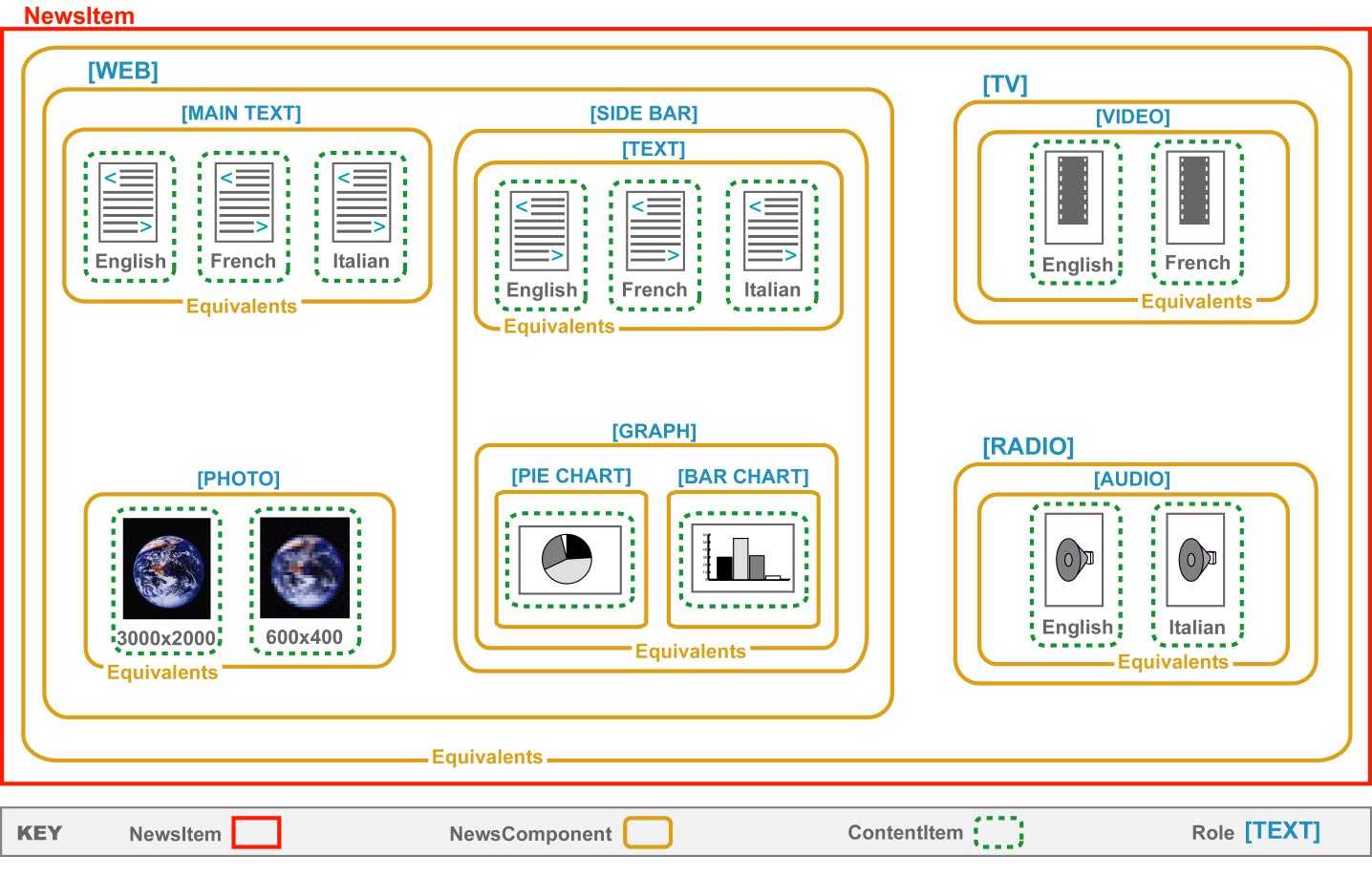
The NewsComponent is a container for news objects. It is used to identify the role of news objects in relation to one another and to ascribe metadata to them. The Essential attribute indicates whether the provider considers that this NewsComponent is essential to the meaning of the NewsComponent within which it is contained. The EquivalentsList attribute indicates whether or not the NewsItems or NewsItemRefs, NewsComponents or ContentItems contained within this one are equivalent to one another in content and/or meaning. The Role subelement of a NewsComponent specifies the role played by a NewsComponent within a NewsComponent that contains it. The outermost NewsComponent within a NewsItem need not specify a Role attribute value. The value of the FormalName attribute is a formal name for the Role. Its meaning and permitted values are determined by a controlled vocabulary.
|
<!ELEMENT NewsComponent (Comment* , Catalog? , TopicSet* , Role? , BasisForChoice* , NewsLines? , AdministrativeMetadata? , RightsMetadata? , DescriptiveMetadata? , Metadata* , ((NewsItem | NewsItemRef)+ | NewsComponent+ | ContentItem+)?)> <!ATTLIST NewsComponent %localid; Essential (yes | no) "no" EquivalentsList (yes | no) "no" xml:lang CDATA #IMPLIED > <!ELEMENT Role EMPTY> <!ATTLIST Role %localid; %formalname; > |
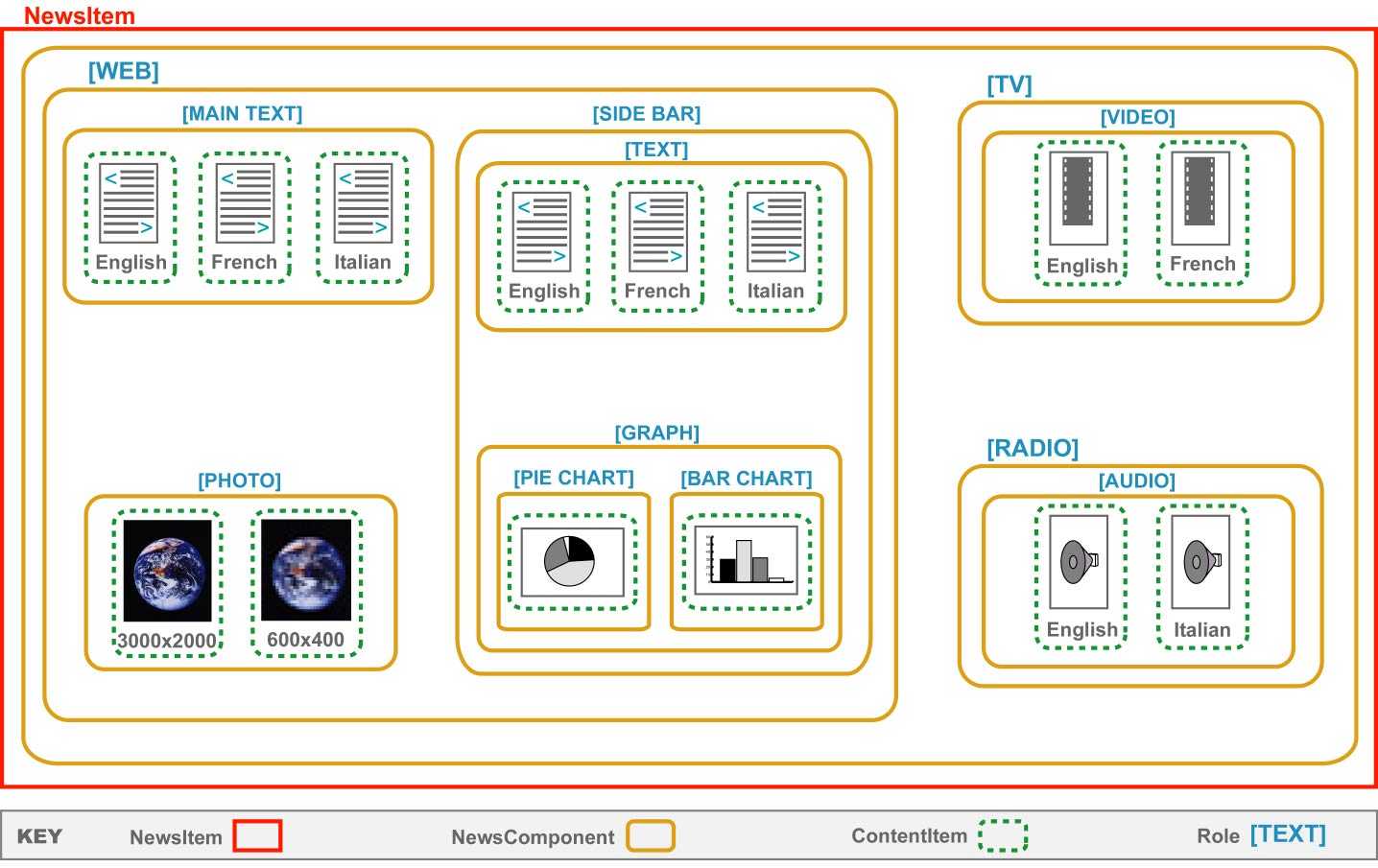
The following figure shows a single NewsItem comprising three NewsComponents that tell the same story for WEB, for TV and for RADIO. The TV and RADIO versions each contain a single NewsComponent (VIDEO and AUDIO respectively). The WEB version comprises multiple NewsComponents (MAIN TEXT, PHOTO and SIDE BAR). The SIDE BAR has two NewsComponents (TEXT and GRAPH). Finally, the GRAPH has two NewsComponents showing the same information in different ways (PIE CHART and BAR CHART).
The VIDEO, AUDIO, TEXT and MAIN TEXT NewsComponents contain ContentItems that carry the story in different languages. The PHOTO NewsComponent contains ContentItems that have different resolutions. The PIE CHART and BAR CHART NewsComponents contain just one ContentItem each.
|
Here we see how the example illustrated above is structured in the NewsML document. <NewsItem> <Catalog> <Resource> <Url>http://www.mysite.com/MyRolesVocabulary.xml"</Url> <DefaultVocabularyFor Context="Role"/> </Catalog> ... <NewsComponent EquivalentsList="yes"> <BasisForChoice>./Role/@FormalName</BasisForChoice> <NewsComponent EquivalentsList="no"> <Role FormalName="WEB"/> <NewsComponent EquivalentsList="yes"> <Role FormalName="MAIN TEXT"/> <BasisForChoice>./Role/@FormalName</BasisForChoice> <ContentItem>...</ContentItem> <ContentItem>...</ContentItem> <ContentItem>...</ContentItem> </NewsComponent> <NewsComponent EquivalentsList="yes"> <Role FormalName="PHOTO"/> <ContentItem>...</ContentItem> <ContentItem>...</ContentItem> </NewsComponent> <NewsComponent EquivalentsList="no"> <Role FormalName="SIDE BAR"/> <NewsComponent EquivalentsList="yes" Essential="yes"> <Role FormalName="TEXT"/> <ContentItem>...</ContentItem> <ContentItem>...</ContentItem> <ContentItem>...</ContentItem> </NewsComponent> <NewsComponent EquivalentsList="yes" Essential="yes"> <Role FormalName="GRAPH"/> <BasisForChoice>./Role/@FormalName</BasisForChoice> <NewsComponent> <Role FormalName="PIE CHART"/> <ContentItem>...</ContentItem> </NewsComponent> <NewsComponent> <Role FormalName="BAR CHART"/> <ContentItem>...</ContentItem> </NewsComponent> </NewsComponent> </NewsComponent> </NewsComponent> <NewsComponent> <Role FormalName="TV"/> <NewsComponent EquivalentsList="yes"> <Role FormalName="VIDEO"/> <ContentItem>...</ContentItem> <ContentItem>...</ContentItem> </NewsComponent> </NewsComponent> <NewsComponent> <Role FormalName="RADIO"/> <NewsComponent EquivalentsList="yes"> <Role FormalName="AUDIO"/> <ContentItem>...</ContentItem> <ContentItem>...</ContentItem> </NewsComponent> </NewsComponent> </NewsComponent> </NewsItem> |
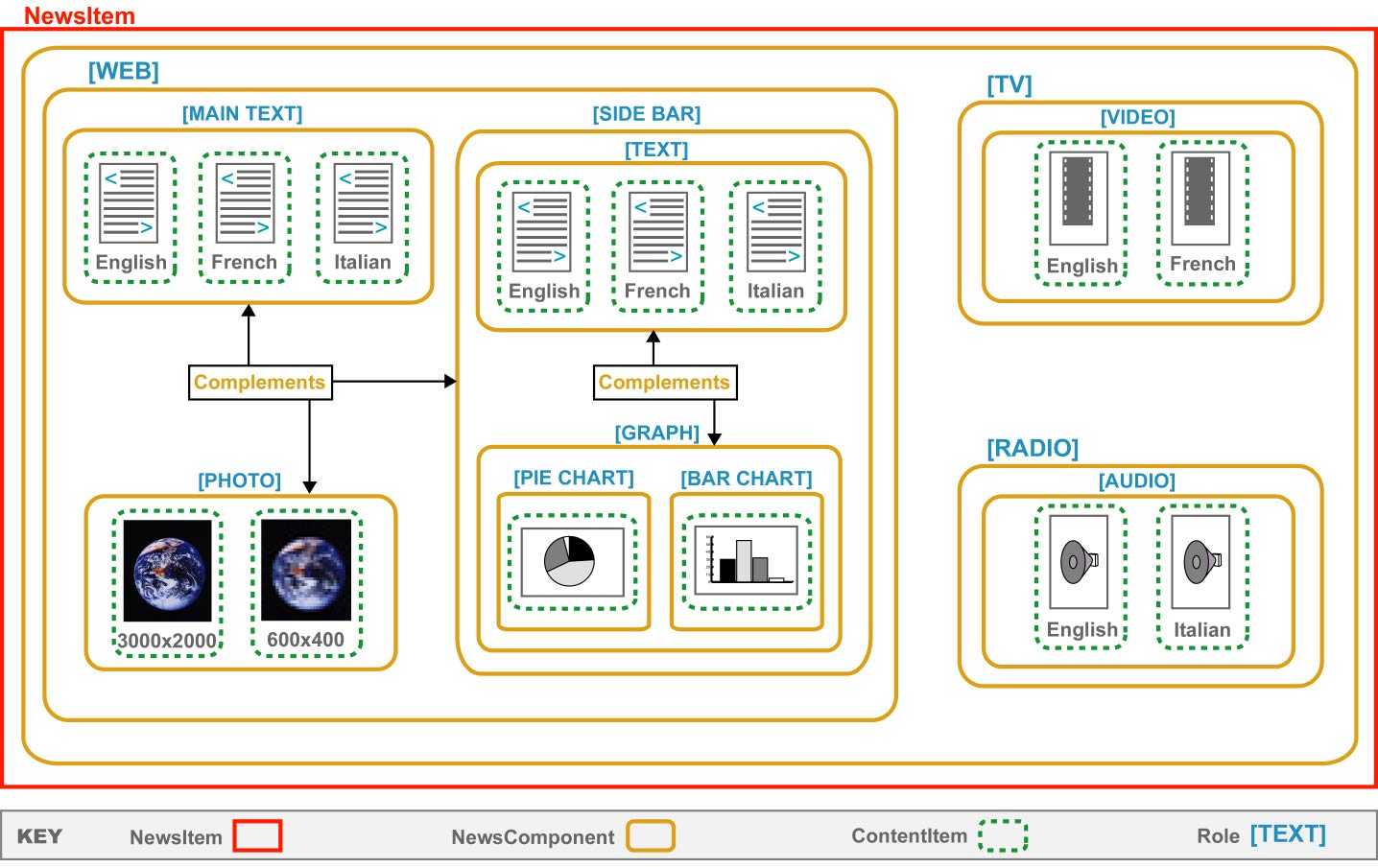
The distinction between those NewsComponents that are EquivalentsLists and those that are not is clarified in the following two pictures.
The content of the BasisForChoice element is an XPath pattern or element-type name identifying information within each NewsComponent or ContentItem that can be used as a basis for choice between equivalent NewsComponents or ContentItems. If the XPath pattern begins with a . character, this represents the ‘root’ of the XPath and corresponds to the NewsComponent or ContentItem itself. By applying the XPath pattern to each NewsComponent or ContentItem in turn within the set of equivalents, the system can extract the data on the basis of which a choice between the items can be made. If multiple matches to the XPath pattern are present within the subtree that begins at the ‘root’, only the first match found in document order is significant. The optional Rank attribute allows providers to place a numerical order on the importance they think should be attached to the different bases for choice. Smaller numbers represent higher importance.
|
<!ELEMENT BasisForChoice (#PCDATA)> <!ATTLIST BasisForChoice %localid; Rank CDATA #IMPLIED > |
|
The following example shows the Role of the inner NewsComponents (in this case PIE CHART or BAR CHART) being suggested as a basis for choice between them. The ./ in the BasisForChoice is XPath syntax representing a child element of the root of the path, which is each NewsComponent between which a choice is being made. <NewsComponent EquivalentsList="yes" Essential="yes"> <Role FormalName="GRAPH"/> <BasisForChoice>./Role</BasisForChoice> <NewsComponent> <Role FormalName="PIE CHART"/> <ContentItem>...</ContentItem> </NewsComponent> <NewsComponent> <Role FormalName="BAR CHART"/> <ContentItem>...</ContentItem> </NewsComponent> </NewsComponent> The following example uses a more complex XPath expression to indicate that the basis for choice between the ContentItems is the Value attribute of the Property element whose FormalName attribute has the value PixelWidth. <Catalog> <Resource Duid="resource1"> <Urn>urn:newsml:mydomain.com:20010101:Characteristics:3</Urn> <Url>www.mydomain.com/vocabs/characteristics.xml</Url> <DefaultVocabularyFor Context="Property"/> </Resource> </Catalog> ... <NewsComponent EquivalentsList="yes"> <BasisForChoice>.//Property[@FormalName="PixelWidth"]/@Value</BasisForChoice> <ContentItem Href="pictures/4769w336.jpg"> <MimeType FormalName="image/jpeg"/> <Characteristics> <SizeInBytes>22999</SizeInBytes> <Property FormalName="PixelWidth" Value="336"/> <Property FormalName="PixelHeight" Value="224"/> </Characteristics> </ContentItem> <ContentItem Href="pictures/4769w170.jpg"> <MimeType FormalName="image/jpeg"/> <Characteristics> <SizeInBytes>8449</SizeInBytes> <Property FormalName="PixelWidth" Value="170"/> <Property FormalName="PixelHeight" Value="224"/> </Characteristics> </ContentItem> </NewsComponent> |
|
Example 2: Consider the following NewsComponent <NewsComponent EquivalentsList="yes"> <BasisForChoice>@xml:lang</BasisForChoice> <NewsComponent xml:lang="en-US"> ... </NewsComponent> <NewsComponent xml:lang="fr-FR"> ... </NewsComponent> </NewsComponent> In the above example, the outer NewsComponent has 2 children NewsComponents, which are equivalents to one another, where the BasisForChoice is the xml:lang attribute. The BasisForChoice indicates we should use the "child" axis of each child NewsComponent in looking for the xml:lang attribute. As such, this example is valid since xml:lang is a direct child of each child NewsComponent. Note that the above structuring of BasisForChoice is equivalent to the following: <BasisForChoice>./@xml:lang</BasisForChoice> In both cases we are indicating that the child axis of the children NewsComponents is be searched.
Example 3: <NewsComponent EquivalentsList="yes"> <BasisForChoice>@xml:lang</BasisForChoice> <NewsComponent > <NewsComponent xml:lang="en-US"> ... </NewsComponent> </NewsComponent> <NewsComponent> <NewsComponent xml:lang="fr-FR"> ... </NewsComponent> </NewsComponent> </NewsComponent> In the above, BasisForChoice indicates we should use the "child" axis of each child NewsComponent of the NewsComponent containing the BasisForChoice element. However, in this example, each child NewsComponent does NOT have an xml:lang attribute as a direct child. As such, this BasisForChoice element is incorrectly structured. In this example, the xml:lang attributes appear as descendants of the child NewsComponents. As such, BasisForChoice should be structured as follows: <BasisForChoice>.//@xml:lang</BasisForChoice> ".//" indicates we should search the descendant axes of the children NewsComponents. |
A NewsComponent may contain an optional NewsLines, AdministrativeMetadata, RightsMetadata and DescriptiveMetadata elements. The function of these elements is described in section 5.9, Metadata, of this document. It may also contain any number of Metadata elements, which carry user-defined metadata not defined within the NewsML specification.
A ContentItem is a news object that carries or identifies renderable content (such as text, images, video, audio etc) intended for presentation to humans. Note that NewsML is media-neutral, so the rendering can be through any medium and for any of the human senses (including sight, sound, touch or a combination of these). The recommended format for text contained within ContentItems is IPTC-NAA NITF.
A ContentItem must carry some raw data, contained inline within a DataContent element, or a pointer to it, using the Href attribute of the ContentItem element. If a pointer is used, the NewsML document is to be interpreted in exactly the same way as if the data were included inline. Possible reasons for using pointers include reducing the amount of data that needs to be physically transferred or stored, and handling data objects whose format is such that they cannot be included directly within a well-formed XML document.
The DataContent element may be wrapped in one or more Encoding elements, indicating how it has been encoded. If the raw data of the DataContent element is included inline, care must be taken to ensure that it does not result in the NewsML document ceasing to be well-formed XML, or ceasing to comply with the NewsML DTD. Techniques that can be adopted to ensure that this problem does not arise include:
Ensure that the data contains no characters that could be seen as XML markup
If there are some characters that could be seen as XML markup, but the specific string ]]> does not occur anywhere, to wrap the data in a CDATA section, as described in the XML 1.0 Specification.
If the data consists of XML content, and includes no elements whose names are identical with the NewsML element names, to declare the element types used in the internal DTD subset of the document.
The optional MediaType, MimeType, Format and Notation subelements of a ContentItem indicate its media type, MIME-type, format and notation respectively. The meaning and permitted values of the FormalName attributes on these elements are determined by the controlled vocabularies identified by the Vocabulary and Scheme attributes.
A ContentItem may also contain a Characteristics element that provides information about the physical characteristics of a ContentItem and whose purpose is to help determine the system requirements needed in order to handle the data before or after it has been interpreted. This might cover such things as file size, pixel height and width (for a raster image), number of frames (for a video clip), duration (for an audio file) and number of bytes (for all kinds of object). In NewsML version 1.0, SizeInBytes is the only characteristic that is represented by a specific element type. For all other characteristics, the generic Property element is used. For an explanation of the use of this generic element, see section 5.6.11 Property.
|
<!ENTITY % data " (Encoding | DataContent )?"> <!ELEMENT Encoding %data; > <!ATTLIST Encoding %localid; Notation CDATA #REQUIRED > <!ELEMENT DataContent ANY> <!ATTLIST Data %localid; > <!ELEMENT ContentItem (Comment* , Catalog? , MediaType? , Format? , MimeType? , Notation? , Characteristics? , %data; )> <!ATTLIST ContentItem %localid; Href CDATA #IMPLIED > <!ELEMENT MediaType EMPTY> <!ATTLIST MediaType %localid; %formalname; > <!ELEMENT Format EMPTY> <!ATTLIST Format %localid; %formalname; > <!ELEMENT MimeType EMPTY> <!ATTLIST MimeType %localid; %formalname; > <!ELEMENT Notation EMPTY> <!ATTLIST Notation %localid; %formalname; > <!ELEMENT Characteristics (SizeInBytes? , Property* )> <!ATTLIST Characteristics %localid; > <!ELEMENT SizeInBytes (#PCDATA )> <!ATTLIST SizeInBytes %localid; > |
|
This example carries some inline data that needs to be unbinhexed, then unzipped in order to extract its content. <ContentItem> <Encoding Notation="binhex"> <Encoding Notation="zip"> <DataContent>A873B6FE ...</DataContent> </Encoding> </Encoding> </ContentItem> This example shows a ContentItem that reuses by reference the ContentItem whose Duid is item2 within revision 2 of the IPTC piece about the approval of NewsML 1.0. This ContentItem is stated to be of media-type Text, in TTNITF format, of MIME-type text/vnd.IPTC.NITF, and of notation NITF. It is 2736 bytes long, and its WordCount property, as defined in myproperties.xml, has the value 450. To enable notation-aware XML processors to handle the object, the NITF notation has been formally declared in the internal subset of the NewsML document. <?xml version="1.0" encoding="UTF-8"?> <!DOCTYPE NewsML PUBLIC "urn:newsml:iptc.org:20001006:NewsMLv1.0.dtd:1" "http://www.iptc.org/NewsML/NewsMLv1.0.dtd" [ <!NOTATION NITF PUBLIC "-//IPTC-NAA//DTD NITF-XML 1.0//EN"> ] <NewsML> <Catalog> <Resource> <Urn>urn:newsml:iptc.org:20001006:IptcMediaTypes.xml</Urn> <DefaultVocabularyFor Scheme="IptcMediaTypes" Context="MediaType"/> </Resource> <Resource> <Urn>urn:newsml:iptc.org:20001006:IptcFormats.xml</Urn> <DefaultVocabularyFor Scheme="IptcFormats" Context="Format"/> </Resource> <Resource> <Urn>urn:newsml:iptc.org:20001006:IptcMimeTypes.xml</Urn> <DefaultVocabularyFor Scheme="IptcMimeTypes" Context="MimeType"/> </Resource> <Resource> <Urn>urn:newsml:iptc.org:20001006:IptcNotations.xml</Urn> <DefaultVocabularyFor Scheme="IptcNotations" Context="Notation"/> </Resource> <Resource> <Urn>urn:newsml:mydomain.org:20010101:myproperties.xml</Urn> <DefaultVocabularyFor Scheme="Properties" Context="Property"/> </Resource> </Catalog> ... <ContentItem Href="urn:newsml:iptc.org:20001006:NewsML%201.0%20approved:2#item2"> <MediaType FormalName="Text"/> <Format FormalName="TTNITF"/> <MimeType FormalName="text/vnd.IPTC.NITF"/> <Notation FormalName="NITF"/> <Characteristics> <SizeInBytes>2736</SizeInBytes> <Property FormalName="WordCount" Value="450"/> </Characteristics> </ContentItem> ... </NewsML> |
NewsML recognises the following categories of metadata on NewsComponents:
The AdministrativeMetadata element contains information about the provenance of a NewsComponent. This information applies to the NewsComponent that is the immediate parent of the AdministrativeMetadata element, or the NewsItem that is the immediate parent of that NewsComponent.
The optional FileName element identifies the suggested or actual storage file name for a NewsItem.
The optional SystemIdentifier element specifies a system address (such as a URL) where the item can be found. It provides a system identifier for a NewsItem, in the sense defined by the XML 1.0 Specification.
The optional Provider and Creator elements identify an individual and/or company or organisation that released or created the news object (with an optional Comment to provide any additional relevant information about this).
The optional and repeatable Source element identifies the source (an individual and/or company or organisation) that provided source material for a news object. The optional NewsItem attribute must be present in the case of a syndicated NewsItem. It provides the URN of the NewsItem that is being syndicated. Note that a sequence of Source elements can be used to indicate the sequence of syndicators through which a NewsItem has passed. Again, a Comment can provide any additional relevant information.
The optional and repeatable Contributor element identifies an individual and/or company or organisation that modified or enhanced a news object after its creation. The Comment element here can be used to indicate the nature of their contribution.
Finally, the optional and repeatable Property element can be used to provide any additional administrative metadata that is not explicitly provided for within the NewsML DTD.
|
<!ELEMENT AdministrativeMetadata (Catalog? , FileName? , SystemIdentifier? , Provider? , Creator? , Source* , Contributor* , Property* )> <!ATTLIST AdministrativeMetadata %localid; > <!ELEMENT FileName (#PCDATA )> <!ATTLIST FileName %localid; > <!ELEMENT SystemIdentifier (#PCDATA )> <!ATTLIST SystemIdentifier %localid; > <!ELEMENT Provider (%party;) > <!ATTLIST Provider %localid; > <!ELEMENT Creator (%party;) > <!ATTLIST Creator %localid; > <!ELEMENT Source (%party;) > <!ATTLIST Source %localid; NewsItem CDATA #IMPLIED > <!ELEMENT Contributor (%party;) > <!ATTLIST Contributor %localid; > |
|
In this example, the filename is NewsmlStory.xml, which can be found in the stories subedirectory at www.mydomain.com. The provider is the company represented by a Topic element in the current document whose Duid attribute has the value company1. The creator is the person represented by a Topic element in the current document whose Duid attribute has the value person1. There are two contributors, who provided editorial review, and a quote, respectively. They are represented by Topic elements in the current document whose Duid attributes have the values person2 and person3 respectively. <AdministrativeMetadata> <FileName>NewsmlStory.xml</FileName> <SystemIdentifier>http://www.mydomain.com/stories/NewsmlStory.xml</SystemIdentifier> <Provider> <Party FormalName="News Headlines International" Topic="#company1"/> </Provider> <Creator> <Party FormalName="Doe, John" Topic="#person1"/> </Creator> <Contributor> <Comment>Editorial review</Comment> <Party FormalName="Smith, Jane" Topic="#person2"/> </Contributor> <Contributor> <Comment>Quote</Comment> <Party FormalName="Dumas, Pierre" Topic="#person3"/> </Contributor> </AdministrativeMetadata> |
The RightsMetadata element contains information about the rights pertaining to a NewsComponent, and any relevant usage rights that have been granted by the copyright holder to other parties.
The Copyright element has required CopyrightHolder and CopyrightDate subelements and an optional and repeatable Comment subelement. The assignment attribute indicates whom the copyright was assigned by, with what degree of importance and confidence, and at what date and time according to ISO 8601 Basic Format. The CopyrightDate and CopyrightHolder elements provide natural-language statements of the copyright date and ownership.
The RightsMetadata contains subelements that contain text, optionally interspersed with Origin elements. The textual content is intended for human interpretation. The Origin element is a wrapper for all or part of this text, which provides a pointer to an item of data corresponding formally to what is being described here in natural language. The Href attribute on the Origin element identifies the relevant data, and may be an http URL or a NewsML URN, optionally followed by a fragment identifier. Alternatively, it can be a simple fragment identifier consisting of a # character followed by the value of the Duid of an element in the current document.
However, the Origin elements provide pointers to machine-interpretable data held elsewhere, that conveys the same information as this human-readable text. The UsageRights subelement of RightsMetadata provides information about the usage rights pertaining to a NewsComponent. The UsageRights element is composed of six subelements: UsageType, which provides a natural-language indication of the type of usage to which the rights apply; Geography indicating the geographical area or areas to which specified usage rights pertain; RightsHolder indicating who has the usage rights; Limitations indicating any restrictions on the use of the content of the NewsComponent; and, finally, StartDate and EndDate, indicating the time period over which the stated rights apply.
Finally, the optional and repeatable Property element can be used to provide any additional rights metadata that is not explicitly provided for within the NewsML DTD.
|
<!ELEMENT RightsMetadata ( Catalog? , Copyright* , UsageRights* , Property* )> <!ATTLIST RightsMetadata %localid; %assignment; > <!ELEMENT Copyright ( Comment* , CopyrightHolder , CopyrightDate )> <!ATTLIST Copyright %localid; %assignment; > <!ELEMENT CopyrightHolder (#PCDATA | Origin)*> <!ATTLIST CopyrightHolder %localid; xml:lang CDATA #IMPLIED > <!ELEMENT CopyrightDate (#PCDATA | Origin)*> <!ATTLIST CopyrightDate %localid; xml:lang CDATA #IMPLIED > <!ELEMENT UsageRights ( UsageType? , Geography? , RightsHolder? , Limitations? , StartDate? , EndDate? )> <!ATTLIST UsageRights %localid; %assignment; > <!ELEMENT UsageType (#PCDATA | Origin)*> <!ATTLIST UsageType %localid; xml:lang CDATA #IMPLIED %assignment; > <!ELEMENT Geography (#PCDATA | Origin)*> <!ATTLIST Geography %localid; xml:lang CDATA #IMPLIED %assignment; > <!ELEMENT RightsHolder (#PCDATA | Origin)*> <!ATTLIST RightsHolder %localid; xml:lang CDATA #IMPLIED %assignment; > <!ELEMENT Limitations (#PCDATA | Origin)*> <!ATTLIST Limitations %localid; xml:lang CDATA #IMPLIED %assignment; > |
|
<!ELEMENT StartDate (#PCDATA | Origin)*> <!ATTLIST StartDate %localid; xml:lang CDATA #IMPLIED %assignment; > <!ELEMENT EndDate (#PCDATA | Origin)*> <!ATTLIST EndDate %localid; xml:lang CDATA #IMPLIED %assignment; > <!ELEMENT Origin (#PCDATA | Origin )*> <!ATTLIST Origin %localid; %assignment; Href CDATA #IMPLIED > |
|
In the following example, the Origin elements identify the companies, organisations and regions mentioned in the rights metadata, through references to Topics in the current document. The country (United Kingdom) is identified by reference to the IPTC Countries TopicSet, which serves as a controlled vocabulary incorporating the ISO 2 –letter and 3-letter country code naming schemes. <RightsMetadata> <Copyright> <CopyrightHolder><Origin Href="#organization1">International Press Telecomminications Council</Origin></CopyrightHolder> <CopyrightDate>2000</CopyrightDate> </Copyright> <UsageRights> <UsageType>Television</UsageType> <Geography><Origin Href="urn:newsml:iptc.org:20001006:Countries#isoc826">United Kingdom</Origin></Geography> <RightsHolder><Origin Href="#organization2">BBC</Origin></RightsHolder> <StartDate>July 2000</StartDate> <EndDate>December 2000</EndDate> <Limitations>Acknowledgement of <Origin Href="#organization1">IPTC</Origin> copyright must be made</Limitations> </UsageRights> <UsageRights> <UsageType>Television</UsageType> <Geography><Origin Href="#region1">North America</Origin></Geography> <RightsHolder><Origin Href="#company1">CNN</Origin></RightsHolder> <StartDate>July 2000</StartDate> <EndDate>none</EndDate> <Limitations>Acknowledgement of <Origin Href="#organization1">IPTC</Origin> copyright must be made</Limitations> </UsageRights> </RightsMetadata> |
The DescriptiveMetadata element contains information describing the content of a NewsComponent. Language, Genre, SubjectCode, OfInterestTo, DateLineDate, Location,TopicOccurrence, and Property subelements indicate the NewsComponent’s genre, subject, target audience, and any languages that it may use (this may be useful in determining whether the piece is appropriate for a particular audience or publication), and give information about any people, places, organisations, countries or other real-world things alluded to in the piece, or to whom the piece is relevant in any way.
The Language element indicates the, or a, language used in a content item. The value of the FormalName attribute is a formal name for the Language element. Its meaning and permitted values are determined by the controlled vocabulary identified by the Vocabulary and Scheme elements.
The Genre element indicates the genre of a NewsComponent. The value of the FormalName attribute is a formal name for the Genre. Its meaning and permitted values are determined by the controlled vocabulary identified by the Vocabulary and Scheme elements.
The SubjectCode element contains the IPTC Subject Codes, as defined in the IptcSubjectCodes TopicSet, that indicate the subject of a NewsItem. It consists of one more Subject, SubjectMatter and SubjectDetail elements, optionally amplified by one or more SubjectQualifier elements.
The OfInterestTo element indicates the target audience of a NewsItem. Its Relevance subelement indicates the relevance of a NewsItem to a given target audience. The value of the FormalName attribute provides formal names for the OfInterestTo and Relevance elements, the meaning and permitted values of which are determined by the controlled vocabulary identified by the Vocabulary and Scheme elements.
The DateLineDate element may be used to provide a logical equivalent for the date of creation of the NewsItem. Its content is in the ISO8601 Basic Date Format.
The Location element provides a method of indicating location information using its child Property elements. The optional HowPresent attribute indicates the type of the location.
The TopicOccurrence element states what Topics occur in a NewsComponent. The optional HowPresent attribute indicates the nature of their occurrence. The value of the Topic attribute must consist of a # character followed by the value of the Duid attribute of a Topic in the current document.
Finally, the optional and repeatable Property element can be used to provide any additional descriptive metadata that is not explicitly provided for within the NewsML DTD.
Note particularly, the use of the assignment elements to indicate by whom, and with what degree of confidence the descriptive metadata was assigned. The assignment information is inherited throughout the subtree, unless overruled by new assignment elements at lower levels of the tree. Note that assignment information, including qualifications of degree of competence, and levels of importance, can be provided at any level of detail.
|
<!ELEMENT DescriptiveMetadata ( Catalog? , Language* , Genre* , SubjectCode* , OfInterestTo* , DateLineDate? , Location* , TopicOccurrence* , Property* )> <!ATTLIST DescriptiveMetadata %localid; %assignment; > <!ELEMENT Language EMPTY> <!ATTLIST Language %localid; %formalname; %assignment; > <!ELEMENT Genre EMPTY> <!ATTLIST Genre %localid; %formalname; %assignment; > <!ELEMENT SubjectCode ((Subject | SubjectMatter | SubjectDetail), SubjectQualifier*)*> <!ATTLIST SubjectCode %localid: %assignment; > <!ELEMENT Subject EMPTY> <!ATTLIST Subject %localid; %formalname; %assignment; > <!ELEMENT SubjectMatter EMPTY> <!ATTLIST SubjectMatter %localid; %formalname; %assignment; > |
|
<!ELEMENT SubjectDetail EMPTY> <!ATTLIST SubjectDetail %localid; %formalname; %assignment; > <!ELEMENT SubjectQualifier EMPTY> <!ATTLIST SubjectQualifier %localid; %formalname; %assignment; > <!ELEMENT TopicOccurrence EMPTY > <!ATTLIST TopicOccurrence %localid; %assignment; Topic CDATA #IMPLIED > <!ELEMENT OfInterestTo (Relevance?)> <!ATTLIST OfInterestTo %localid; %formalname; %assignment; > <!ELEMENT Relevance EMPTY > <!ATTLIST Relevance %localid; %formalname; %assignment; > |
|
In this example, the relevant IPTC vocabularies are declared as defaults for TopicType, Language, Genre, Subject and OfInterestTo elements, and Confidence and Importance attributes. A TopicType is then provided that contains two people (Bill Clinton and Yasser Arafat) and one location (The White House Lawn). Then follows the DescriptiveMetadata element. This metadata is declared to have been assigned with Confidence High and Importance 5 (which the IPTC importance vocabulary describes as Normal). The descriptive metadata tells us that this NewsComponent is in English, its genre is Current, its subject is IPTC Subject 11000000 (which the IPTC subject codes vocabulary describes as Politics). We are also told that there is a Prominent occurrence of President Clinton, and a Passing occurrence of The White House Lawn, and a RelatesTo occurrence of Yasser Arafat. This might be an appropriate set of TopicOccurrences for a NewsComponentconsisting of a photograph of President Clinton waiting on the White House Lawn for the arrival of Yasser Arafat’s helicopter for a summit meeting, for example. <Catalog> <Resource> <Urn>urn:newsml:iptc.org:20001006:IptcTopicTypes</Urn> <DefaultVocabularyFor Scheme="IptcTopicTypes" Context="TopicType"/> </Resource> <Resource> <Urn>urn:newsml:iptc.org:20001006:Languages</Urn> <DefaultVocabularyFor Scheme="IsoLanguageCode" Context="Language"/> </Resource> <Resource> <Urn>urn:newsml:iptc.org:20001006:IptcGenre</Urn> <DefaultVocabularyFor Scheme="IptcGenre" Context="Genre"/> </Resource> <Resource> <Urn>urn:newsml:iptc.org:20001006:IptcSubjectCodes</Urn> <DefaultVocabularyFor Scheme="IptcSubjectCode" Context="Subject"/> </Resource> <Resource> <Urn>urn:newsml:iptc.org:20001006:IptcOfInterestTo</Urn> <DefaultVocabularyFor Scheme="IptcOfInterestTo" Context="OfInterestTo"/> </Resource> <Resource> <Urn>urn:newsml:iptc.org:20001006:IptcConfidence</Urn> <DefaultVocabularyFor Scheme="IptcConfidence" Context="@Confidence"/> </Resource> <Resource> <Urn>urn:newsml:iptc.org:20001006:IptcImportance</Urn> <DefaultVocabularyFor Scheme="IptcImportance" Context="@Importance"/> </Resource> </Catalog> <TopicSet FormalName="Person"> <Topic Duid="person1" FormalName="Person"> <TopicType FormalName="Person"/> <Description xml:lang="en-GB">President Clinton</Description> </Topic> <Topic Duid="person2"> <TopicType FormalName="Person"/> <Description xml:lang="en-GB">Yasser Arafat</Description> </Topic> <Topic Duid="location1"> <TopicType FormalName="Location"/> <Description xml:lang="en-GB">The White House Lawn</Description> </Topic> </TopicSet> <DescriptiveMetadata Confidence="High" Importance="5"> <Language FormalName="en"/> <Genre FormalName="Current"/> <SubjectCode> <Subject FormalName="11000000"/> </SubjectCode> <TopicOccurrence Topic="#person1" HowPresent="Prominent"/> <TopicOccurrence Topic="#person2" HowPresent="RelatesTo"/> <TopicOccurrence Topic="#location1" HowPresent="Passing"/> </DescriptiveMetadata> |
NewsComponents may include NewsLines, whose purpose is to provide a human-readable (publishable) representation of certain aspects of the metadata. The NewsLines element contains HeadLine, SubHeadLine, ByLine, DateLine, CreditLine, CopyrightLine, RightsLine, SeriesLine, SlugLine, and KeywordLine subelements. All these are optional and repeatable with the exception that a SubHeadLine may only occur if a HeadLine is also present.
The HeadLine element provides a displayable headline and the SubHeadLine element provides a displayable subsidiary headline.
The ByLine element provides a natural-language statement of the author/creator information.
The ByLineTitle element provides a natural-language statement of the title of the author/creator information.
The DateLine element provides a natural-language statement of the date and/or place of the NewsComponent’s creation.
The CreditLine element provides a natural-language statement of credit information.
The CopyrightLine element provides a natural-language statement of the copyright information.
The RightsLine element provides a displayable version of rights information. Note that this is distinct from copyright information. Copyright information is about who owns a news object; rights information is about who is allowed to use it, in what way and under what circumstances.
The SeriesLine element provides a displayable version of information about a news object's place in a series.
The SlugLine element provides a string of text, possibly embellished by hyperlinks and/or formatting, used to display a NewsItem's slug line. (Note that the meaning of the term "slug line", and the uses to which it is put, are a matter for individual providers to define within their own workflow and business practice.)
The KeywordLine element provides a displayable set of keywords relevant to a news object. This can be used by a
NewsML system to assist manual or automated searches.
NewsLine elements allow for the inclusion of a type of newsline not included in the NewsML specification. Each newsline element must contain one NewsLineType element and may contain one or more NewsLineText elements. If more than one NewsLineText element is present, then they should be distinguished by their xml:lang attribute, which indicates the language in which they are written.
NewsLineType elements indicate a user-defined NewsLine type. The value of the FormalName attribute is a formal name for the NewsLineType. Its meaning and permitted values are determined by a controlled vocabulary identified by the Vocabulary and Scheme attributes.
NewsLineText elements contain the text of a NewsLine of a user-defined type. NewsLineText elements may contain any mix of plain text and Origin elements.
The NewsLines element is a container for all the NewsLines that a NewsComponent has.
|
<!ELEMENT NewsLines ((HeadLine , SubHeadLine* ) | (ByLine , ByLineTitle*) | DateLine | CreditLine | CopyrightLine | RightsLine | SeriesLine | SlugLine | KeywordLine | NewsLine )*> <!ATTLIST NewsLines %localid; > <!ELEMENT HeadLine (#PCDATA | Origin)*> <!ATTLIST HeadLine %localid; xml:lang CDATA #IMPLIED > <!ELEMENT SubHeadLine (#PCDATA | Origin)*> <!ATTLIST SubHeadLine %localid; xml:lang CDATA #IMPLIED > <!ELEMENT ByLine (#PCDATA | Origin)*> <!ATTLIST ByLine %localid; xml:lang CDATA #IMPLIED > <!ELEMENT DateLine (#PCDATA | Origin)*> <!ATTLIST DateLine %localid; xml:lang CDATA #IMPLIED > <!ELEMENT CreditLine (#PCDATA | Origin)*> <!ATTLIST CreditLine %localid; xml:lang CDATA #IMPLIED > <!ELEMENT CopyrightLine (#PCDATA | Origin)*> <!ATTLIST CopyrightLine %localid; xml:lang CDATA #IMPLIED > <!ELEMENT RightsLine (#PCDATA | Origin)*> <!ATTLIST RightsLine %localid; xml:lang CDATA #IMPLIED > <!ELEMENT SeriesLine (#PCDATA | Origin)*> <!ATTLIST SeriesLine %localid; xml:lang CDATA #IMPLIED > <!ELEMENT SlugLine (#PCDATA | Origin)*> <!ATTLIST SlugLine %localid; xml:lang CDATA #IMPLIED > |
|
<!ELEMENT KeywordLine (#PCDATA | Origin)*> <!ATTLIST KeywordLine %localid; xml:lang CDATA #IMPLIED > <!ELEMENT NewsLine (NewsLineType , NewsLineText+)> <!ATTLIST NewsLine %localid; > <!ELEMENT NewsLineText (#PCDATA |Origin)*> <!ATTLIST NewsLineText %localid; xml:lang CDATA #IMPLIED > <!ELEMENT NewsLineType EMPTY> <!ATTLIST NewsLineType %localid; %formalname; > |
|
In this example, the Origin element is used to link parts of the news lines to topics in a local topic set, which have Details attributes to reference external information sources abou the topics in question. In addition, a user-defined newsline type is declared in the local topic set and used in an additional NewsLine element. <TopicSet Duid="LocalTopicSet" FormalName="person"> <Topic Duid="person1" Details=http://mydomain.com/staff.xml#jwilson"> <TopicType FormalName="person" Vocabulary="http://www.iptc.org/NewsML/topicsets/iptc-topictypes.xml"/> </Topic> <Topic Duid="position1" Details=http://mydomain.com/positions.xml#staffreporter"> <TopicType FormalName="position" Vocabulary="#LocalTopicSet"/> </Topic> <Topic Duid="newspaper1" Details=http://mydomain.com/papers.xml#dailyrecord"> <TopicType FormalName="newspaper" Vocabulary="#LocalTopicSet"/> </Topic> <Topic Duid="newslinetype1"> <TopicType FormalName="NewsLineType" Vocabulary="http://www.iptc.org/NewsML/topicsets/iptc-topictypes.xml "/> <FormalName>ImpactLine</FormalName> <Description xml:lang="en-GB">An indication of the significance of the event described</Description> </Topic> <Topic Duid="topictype1"> <TopicType FormalName="TopicType" Vocabulary="http://www.iptc.org/NewsML/topicsets/iptc-topictypes.xml"/> <FormalName>position</FormalName> <Description xml:lang="en-GB">An job function performed by a person.</Description> </Topic> <Topic Duid="topictype2"> <TopicType FormalName="TopicType" Vocabulary="http://www.iptc.org/NewsML/topicsets/iptc-topictypes.xml"/> <FormalName>newspaper</FormalName> <Description xml:lang="en-GB">A publication that carries news.</Description> </Topic> </TopicSet> ... <NewsLines> <HeadLine>Clinton Addresses Crowd</HeadLine> <SubHeadLine>New policies announced</SubHeadLine> <ByLine>By <Origin Href="#person1">James Wilson</Origin></ByLine> <CreditLine><Origin Href="#position1">Staff Reporter</Origin> of <Origin Href="newspaper1">The Daily Record</Origin></CreditLine> <NewsLine> <NewsLineType FormalName="ImpactLine" Vocabulary="#LocalTopicSet"/> <NewsLineText>Key pre-election rallying call</NewsLineText> </NewsLine> </NewsLines> |
A new revision of a NewsItem is created by publishing a new NewsML document containing a NewsItem with the same ProviderId, DateId and NewsItemId as the NewsItem to be revised.
To modify one or more subelements of NewsManagement and/or Identification, without any change to any other parts of the NewsItem, then the content of the RevisionId element should be identical to the original one, the value of its Update attribute should be set to A, and the NewsItem should contain the complete Identification and NewsManagement elements, incorporating any changes, and nothing else.
If any other part of the NewsItem is modified in any way, then the RevisionId should be a higher number than it was previously, and its PreviousRevision attribute should be equal to the previous version’s RevisionId. There are then two choices:
The entire NewsItem is published, incorporating any changes that may have been made, and the value of the Update attribute of the RevisionId element is set to N
The NewsComponent subelement of the NewsItem is not included in the new document, but in its place, one or more Update elements are provided, indicating the modifications that have been made, and the value of the Update attribute of the RevisionId element is set to U.
The Update element indicates a modification to an existing NewsItem. This can be an insertion, replacement
or deletion. Note that the Update element cannot be used to modify the NewsManagement or Identification element, or any of their descendants. Modifications to these parts of the NewsItem can be made by issuing the NewsItem under the current revision number, with only the Identification and NewsManagement elements present. These will replace the previous Identification and NewsManagement elements in their totality. An Update element contains any number of subelements of the following kinds:
It is the responsibility of the recipient to generate a new copy of the NewsItem on their system, by applying the Update instructions to the previous revision of the NewsItem, which they should already have, or be able to request from the provider. To generate the new revision of the NewsItem, each subelement of each Update element is processed in turn, in the order in which they occur. The value of each subelement's DuidRef attribute should match the Duid of an element in the previous revision. This is the element to which the instruction applies. In the case of Delete, the identified element is omitted from the revised NewsItem. In the case of Replace, the identified element is replaced by the content of the Replace element. In the case of InsertBefore, the content of the InsertBefore element is added to the revision in front of the identified element. In the case of InsertAfter, the content of the InsertAfter element is added to the revision after the identified element.
|
<!ELEMENT Update (InsertBefore | InsertAfter | Replace | Delete )*> <!ATTLIST Update %localid; > <!ELEMENT InsertBefore ANY > <!ATTLIST InsertBefore %localid; DuidRef CDATA #REQUIRED > <!ELEMENT InsertAfter ANY > <!ATTLIST InsertAfter %localid; DuidRef CDATA #REQUIRED > |
|
<!ELEMENT Replace ANY > <!ATTLIST Replace %localid; DuidRef CDATA #REQUIRED > <!ELEMENT Delete EMPTY > <!ATTLIST Delete %localid; DuidRef CDATA #REQUIRED > |
NewsML supports the use of pointers to include data by reference rather than explicitly. This mechanism is used to reference external data objects within ContentItems, and may also be used to include an existing NewsItem in a NewsML document without having to copy all its content to the new document.
In the case of ContentItems, the Href attribute of the ContentItem is used to include an external object by reference, as explained in section 5.8 The Structure of a ContentItem.
In the case of NewsItems, the NewsItemRef provides a pointer to a NewsItem that is deemed to replace the NewsItemRef element. The NewsItem attribute is a pointer to the relevant NewsItem. Its value can be an http URL or a NewsML URN or a fragment identifier consisting of a # sign followed by the Duid of a NewsItem in the current document. The optional Comment allows opportunity to comment on the reason for including this NewsItem.
|
<!ELEMENT NewsItemRef (Comment*)> <!ATTLIST NewsItemRef %localid; NewsItem CDATA #IMPLIED > |
NewsML will provide generic Metadata, Property, Label and NewsLine elements, each of which has a name drawn from a declared naming scheme. These elements can be used to add new kinds of metadata, newslines or labels in a controlled manner, thereby allowing the expressive capabilities of NewsML documents to develop over time. When a new version of NewsML itself is released, it will be possible to add some or all of these new kinds of metadata, newslines or labels to the NewsML DTD or schema.
AdministrativeMetadata identifies the source (author, publisher, redistributor, etc) of NewsComponents. It is therefore possible for receivers of NewsML documents to form judgements as to the confidence they place in the information they receive, based in part on the identity of the people and/or organisations from which it comes.
NewsML does not explicitly provide mechanisms for authentication and the attachment of digital signatures to news objects. It is anticipated that the mechanisms defined by the W3C in its XML-Signatures specification will be used, once that specification has become a W3C Recommendation.
AdministrativeMetadata Metadata that gives information about the provenance of a NewsComponent and an indication of how to name it within an XML content-management system.
AllowedValues An attribute of the Property element that points to a controlled vocabulary that delimits the set of allowed values for the property.
AssignedBy An indication of who, or what system, assigned a piece of metadata.
assignment An entity comprising a set of elements that allow assertions to be made as to who, or what system, assigned a piece of metadata, with what degree of confidence, what importance they give to the assignment, and what is the nature of the presence of the referenced topic in this context.
AssociatedWith A reference to a NewsItem with which this one is associated.
attribute An XML construct consisting of a name-value pair representing a property of an XML element. The attribute statement is contained within the start-tag of the element.
Example:
<MyElement MyProperty="myvalue"/>
Here, the MyElement element has a MyProperty property whose value is myvalue.
BasisForChoice A subelement of a NewsComponent, whose content is an XPath statement that identifies, relative to each item within the NewsComponent, a data object whose value can be used as a basis for selection among the items.
ByLine A displayable version of author/creator information.
ByLineTitle A displayable version of the title of the author/creator information.
Catalog A container for Resource and TopicUse elements. Resource elements map URNs to URLs and indicate default vocabularies which apply to the formal names of certain elements within the subtree that begins with the immediate parent of the Catalog element.
Characteristics Provides information about the physical characteristics of a ContentItem that is relevant to the system requirements needed in order to handle the data before or after it has been interpreted. This covers such things as file size in bytes, and other properties that may be defined by users through controlled vocabularies, or added to the NewsML DTD in future versions.
Comment A multi-language description of, or statement about, the current element. It provides additional human-readable information that amplifies the information contained within the comment’s parent element.
complements News objects that should be taken together, as each provides only a part of the full information that may be needed.
Confidence A rating of the confidence with which a topic reference was assigned in a given context. The value of the Confidence attribute is governed by a controlled vocabulary.
content All the data that occurs between an element's start-tag and its end-tag.
Example:
<MyElement>text<ContentItem Href="a.xml"/></MyElement>
Here, the content of the MyElement element is
text<ContentItem Href="a.xml"/>
The ContentItem element has no content.
ContentItem A news object that contains, or provides a pointer to, a data object that carries renderable content (such as text, images, video, audio etc) intended for presentation to humans.
Context An attribute of TopicUse whose value is an XPath pattern indicating the context where the referenced topic is used within the subtree to which the current Catalog applies.
Contributor An individual and/or company or organisation that modified or enhanced a news object after its creation.
controlled vocabulary A list of defined terms and their meanings that is maintained according to a formal change-management process (see also naming scheme).
Copyright The copyright that pertains to a news object.
CopyrightDate A natural-language statement of the copyright date.
CopyrightHolder A natural-language statement indicating who owns the copyright.
CopyrightLine A natural-language statement of the copyright information.
Creator An individual and/or company or organisation that created a news object.
CreditLine A natural-language statement of credit information.
DataContent The data that carries the content of a ContentItem.
DateAndTime A formal representation of a date and, optionally, time, expressed in ISO 8601 Basic Format (CCYYMMDDTHHMMSS {+ or -} HHMM) (century, year, month, day, time separator, hours, minutes, seconds, timezone separator, hours, minutes) and usable by an automated system.
DateId A date identifier of a NewsItem in short ISO 8601 date format (CCYYMMDD). The DateId is part of the formal identification of the NewsItem, and must remain the same through successive revisions of the same NewsItem.
DateLabel A string representation of a date or date and time, used by human users to help identify a NewsItem.
DateLine A natural-language statement of the date and/or place of creation.
DateLineDate A logical represenation of the date and/or place of creation in ISO8601 Basic Format.
declaration A string of characters within a DTD that defines a specific structural aspect of documents conforming to the DTD.
default vocabulary A controlled vocabulary providing default meaning and permitted values unless or until overridden by another specifically referenced controlled vocabulary.
DefaultVocabularyFor An indication that the parent Resource provides the default vocabulary that determines the meanings and permitted values of the data occurring in a particular part of a NewsML document subtree.
Delete An instruction to delete a designated element within a NewsItem that is a previous revision of the current NewsItem.
DerivedFrom A reference to a NewsItem from which this one is derived.
Description A description that identifies a Topic, thereby indicating the meaning of a formal name associated with that Topic. The optional Variant attribute allows multiple descriptions to be given in the same language and meaningfully distinguished from one another.
DescriptiveMetadata Metadata information describing the content of a NewsComponent.
Details An attribute of the Topic element providing a pointer, in the form of a URL or URN, to additional information about the Topic.
DOCTYPE declaration A special declaration within an XML document that designates an external file containing a DTD to which the document conforms.
DTD Document Type Definition. This is a set of declarations that determine the structure of an XML document. The DTD may be included in the internal subset within the document itself, in the external subset within a file referenced from the document’s DOCTYPE declaration, or a combination of the two.
Duid Document-unique identifier. This optional attribute allows an element to be uniquely identified within a NewsML document.
DuidRef An attribute whose value matches that of the Duid attribute of a referenced element.
element A component of an XML document. The element begins with a start-tag including the name of the element type and optionally some attributes. It may in addition contain some content, comprising other elements (known as its subelements), text, or a mixture of the two. It ends with an end-tag or, if it has no content, an additional slash at the end of its start tag.
Example:
<MyElement>some text<EmptyElement/></MyElement>
Here, an element of type MyElement contains some text and an element of type EmptyElement.
element type A category of XML element, differentiated by the name that appears in the start and end tags. Elements of a given element type must comply with the structural rules defined in the declarations for that element type within the DTD or schema.
encoding The rules to be applied when interpreting the data contained within a data object. Examples of encoding are ASCII, UTF-8, UTF-16, base64, uuencode, zip. An XML file may use any of these encodings, which determine the rules that enable the byte stream to be translated into a character stream.
Encoding The encoding of the data comprising the content of a ContentItem.
EndDate A natural-language statement of the date at which specified usage rights come to an end.
entity A data object that can be included by reference in an XML document. The entity may be a special character referenced by its character number, a string of text defined in a declaration in the DTD or schema, or an external file containing either text or some other kind of data, which may include binary data such as audio, video or images.
entity reference A string of characters in an XML document that serves as a pointer to an entity, which is included in the document in that place. For example, if “The NewsML functional specification” has been defined as an entity whose name is nfs, then in the phrase “Please refer to the &nfs; for details”, the characters “&nfs;” are an entity reference, and the phrase represented is in fact “Please refer to the NewsML functional specification for details”.
equivalents News objects between which a choice should be made, since the information they contain is equivalent.
EquivalentsList An attribute of a NewsComponent that indicates whether the news objects contained within it are equivalents to one another in content and/or meaning – or whether they are complements.
Essential An attribute of a NewsComponent that indicates whether the provider considers that this NewsComponent is essential to the meaning of the NewsComponent within which it is contained.
Euid Element-unique identifier. This is an optional attribute on every NewsML element type. It allows an element to be uniquely identified among others of the same element type within the same parent element.
external subset A set of declarations governing an XML document's structure and contained within a DTD file referenced from the document’s DOCTYPE declaration.
FileName The suggested or actual storage file name for a NewsItem.
FirstCreated The date and, optionally, time at which a NewsItem was first created, expressed in ISO 8601 Basic Format.
formalname An entity consisting of FormalName, Vocabulary and Scheme attributes. FormalName consists of a string of characters whose meaning is determined by a controlled vocabulary. The Vocabulary attribute, if present, provides a pointer to a TopicSet which is the controlled vocabulary that can be used to resolve the meaning of the FormalName. The Scheme attribute, if present, serves to distinguish which of possibly multiple naming schemes in the controlled vocabulary is the one that governs this FormalName.
FormalName A string of characters whose meaning is determined by a naming scheme within a controlled vocabulary. The controlled vocabulary may (but is not required to) take the form of a NewsML TopicSet.
format The file type used to carry the information contained in a data object. The format determines what applications are capable of processing, interpreting or rendering the object. Examples of format are GIF, JPEG, WAV, Microsoft Word and XML.
Format An indication of the format of a ContentItem.
fragment identifier That part of a URL or URN that identifies a location or substring within the identified resource. It is separated from the main part of the URL or the URN by a # character.
FutureStatus An indication of the status a NewsItem will have at a specified future date.
Genre An indication of the Genre of a NewsComponent.
Geography A natural-language statement of the geographical areas or areas to which specified usage rights apply.
HeadLine A displayable headline.
HowPresent An indication of the way in which a piece of metadata applies.
Href An attribute that serves as a pointer to information elsewhere in a NewsML document or in some external resource.
Identification Metadata that is useful in identifying a NewsItem. It comprises a NewsIdentifier, an optional NameLabel and DateLabel and an optional and repeatable Label.
IETF Internet Engineering Task Force
Importance A rating of the importance the party assigning a piece of metadata attaches to it.
inclusion by reference The use within a document of a pointer to a data object in place of the object itself. This mechanism makes it possible to send large NewsML documents by transmitting only a few characters. Some of the characters transmitted will be pointers, which may be replaced by the objects themselves when the NewsML document is interpreted or used.
InsertAfter An instruction to insert content after a designated element within a NewsItem.
InsertBefore An instruction to insert content before a designated element within a NewsItem.
Instruction An instruction from a news provider to the recipient of a NewsItem.
internal subset A section of an XML document containing some or all of the declarations that define the document’s structure. Those declarations that are not in the internal subset will be in the external subset.
IPTC International Press Telecommunications Council
KeywordLine A displayable set of keywords relevant to a news object. This can be used by a NewsML system to assist manual or automated searches.
Label A human-readable label for a NewsItem.
LabelText The text that constitutes a Label of a given LabelType.
LabelType A user-defined type of Label. The value of the FormalName attribute is a formal name for the LabelType.
Language An identifier of the, or a, language used in a content item.
Location An identifier for a physical location significant to the content of a NewsItem.
Limitations A natural-language statement of the terms and conditions that apply to the specified usage rights.
media type The type of medium through which the information contained in a data object is presented to humans. Examples of media type are video, audio, raster image, vector graphic and text.
Property An indication of the media type of a ContentItem.
metadata Data associated with a data object with the intent of enabling a system to handle that data object appropriately. The system may be a computer application, a business process handled by human beings, or some combination of the two.
Metadata A container for a user-defined type of metadata.
MetadataType An indication of the type of metadata that is represented by the Property elements within this Metadata element.
MIME Multipart Internet Mail Extension. This is a formal specification from IETF, providing a mechanism for specifying the format of data objects to be transmitted over the Internet, in order to allow them to be associated with applications that are capable of interpreting, processing or rendering them.
MIME-type A specific string of characters that identifies the format of a data object in order to associate it with an application capable of interpreting, processing or rendering it. The IETF holds a register of standard MIME-types. Additional MIME-types may be user-defined.
MimeType An indication of the MIME-type of a ContentItem.
NameLabel A string used by human users as a name to help identify a NewsItem.
naming scheme A set of names or codes with known meanings.
news object One of the main constituents of NewsML documents. The different kinds of news object are NewsEnvelope, NewsItem, NewsComponent and ContentItem.
NewsComponent A container for news objects, used to identify the role of news objects in relation to one another, and to ascribe metadata to them.
NewsEnvelope Information about the transmission of one or more NewsItems as a NewsML document.
NewsIdentifier A globally unique identifier for a NewsItem. A 4-part identifier comprising a ProviderId, a DateId, a NewsItemId, and a RevisionId - and a PublicIdentifier that concatenates all four of these subelement components into a single string.
NewsItem A meaningful item of news. This will be an XML element type within NewsML documents. A NewsItem may be simple or complex, and may be in any medium or combination of media. What distinguishes it as a NewsItem is the fact that it is a managed set of information representing a point of view, at a given time, on some event or events. This requires it to have, as a minimum, sufficient metadata to relate it to a time and to a source (person or organisation) whose point of view it represents.
NewsItemId A unique identifier for the NewsItem, determined by the provider, for a given NewsItem. It is for the provider to determine what constitutes the identity of a NewsItem, and on the basis of this, to allocate NewsItemIds in a controlled manner.
NewsItemRef A pointer to an external NewsItem that is deemed to replace the NewsItemRef element.
NewsItemType An indication of the type of a NewsItem.
newsline A special kind of news metadata comprising text intended to provide users with a key item of information about the NewsItem to which it relates. The information conveyed in a NewsLine may duplicate part of the information conveyed by the NewsItem itself or some of its other news metadata. Examples of NewsLine are HeadLine and ByLine.
NewsLine A newsline of a type not included in the NewsML specification.
NewsLines A container for all the NewsLines that a NewsComponent has.
NewsLineText The text of a newsline of user-defined type. There may be more than one NewsLineText element in a given NewsLine, distinguished by language.
NewsLineType An indication of a user-defined NewsLine type.
NewsManagement Information relevant to the management of a NewsItem.
NewsML The root element of a NewsML document. A NewsML document must contain a NewsEnvelope and one or more NewsItems, and may include a Catalog element and a TopicSet element.
NewsProduct An identifier for a product to which all the NewsItems in a NewsML document belong.
NewsService An identifier for a service to which all the NewsItems in a NewsML document belong.
notation A named association between a piece of data and an application capable of interpreting, processing or rendering it. This is a formal construct defined in the XML specification.
Notation An indication of the notation of a ContentItem.
OfInterestTo An indication of the target audience of a NewsItem.
Origin A wrapper for all or part of the text of a piece of text, which provides a pointer to an item of data corresponding formally to what is being described here in natural language.
Party An indication of the person, company or organisation that has a particular relationship to this NewsItem in the news workflow.
pointer A string of characters whose purpose is to identify a data object, either for the purposes of creating a link to it, or for the purposes of including the object itself in a document without having to send the object itself every time the document is transmitted.
PreviousRevision The value of the RevisionId of the previous revision of the current NewsItem. The value of the PreviousRevision attribute must be equal to the content of the RevisionId element of the NewsItem’s previous revision, if there is one, and 0 if the NewsItem has no previous revision.
Priority An indication of the priority notation of a NewsItem.
Property A property of a NewsComponent or of a Topic. The property has a name and either a simple Value or a complex value consisting of a set of further properties. The Value attribute provides a string representation of the value of the property, while the ValueRef attribute points to the value, either in a Topic or any other piece of data. The AllowedValues attribute, if present, points to a controlled vocabulary delimiting the set of allowed values for the property.
Provider An individual and/or company or organisation that releases a news object for publication.
ProviderId A unique identifier for the news provider that produced the NewsItem. It should be an Internet domain name that is owned by the provider at the date identified by the DateId subelement of the NewsIdentifier, or the name for the provider drawn from a controlled vocabulary.
public identifier A string identifier for a resource, drawn from a controlled vocabulary, or using a controlled syntax.
PublicIdentifier A public identifier for a NewsItem (in the sense defined by the XML 1.0 Specification) for a NewsItem.
Rank An integer, serving to prioritise among BasisForChoice elements within a NewsComponent. BasisForChoice elements with a smaller Rank number take priority over those with a larger Rank number.
raw data Data whose structure is not defined by NewsML, and which therefore needs to be passed by the NewsML application to another application or to the user for interpretation or processing.
Relevance An indication of the relevance of a NewsItem to a given target audience.
Repeat An attribute of TransmissionId, which distinguishes a repeat from an earlier transmission.
Replace An instruction to replace a designated element within a NewsItem.
Resource An indication of where a given resource can be found, and whether it is to be used as the default vocabulary for certain formal names within the current subtree of a NewsML document.
RevisionHistory A pointer to a file containing the revision history of the NewsItem.
RevisionId A positive integer indicating which Revision of a given NewsItem this is. It is the responsibility of providers to ensure that any two data objects carrying the same ProviderId, DateId, and NewsItemId are identical in content. If a NewsItem is republished after a change, however slight, a new RevisionId with a larger integer value should be ascribed to the new version.
RevisionStatus Indicates the status that previous revisions how have as a result of the release of the current revision. The optional Revision attribute is an integer, equal to the RevisionId of the revision in question. If it is not present, then the status applies to all previous revisions.
RightsHolder A string of text indicating who has the usage rights, optionally enriched with pointers to further information about the relevant people, companies or organisations.
RightsLine A displayable version of rights information. Note that this is distinct from copyright information. Copyright information is about who owns a news object; rights information is about who is allowed to use it, in what way and under what circumstances.
RightsMetadata Information about the rights pertaining to a NewsComponent.
Role An identifier of the role played by a NewsComponent within a NewsComponent that contains it.
schema A formal definition of the structure of a class of XML documents. A schema is itself an XML document, conforming to the W3C’s XML Schema specification. It is able to specify a richer set of constraints and structural rules than those expressible in a DTD.
Scheme The Scheme attribute serves to distinguish which of possibly multiple naming schemes in the controlled vocabulary is the one that governs the FormalName it qualifies.
SentFrom An individual and/or company or organisation from whom the NewsML document is being sent.
SentTo An individual and/or company or organisation to which the NewsML document is being sent.
SeriesLine A displayable version of information about a news object's place in a series.
SizeInBytes The exact size in bytes of a ContentItem’s inline or referenced data object.
SlugLine A string of text, possibly embellished by hyperlinks and/or formatting, used to display a NewsItem's slug line. (The meaning of the term "slug line", and the uses to which it is put, are a matter for individual providers to define within their own workflow and business practice.)
Source An individual and/or company or organisation that provided source material for a news object.
StartDate A natural-language statement of the date at which specified usage rights come into effect.
Status An indication of the status of a NewsItem.
StatusWillChange Advance notification of a status change that will automatically occur at the specified date and time.
subelement An element contained within another element.
Example:
<MyElement><Child/><Child/></MyElement>
Here, the two Child elements are subelements of the MyElement element.
SubHeadLine A displayable subsidiary headline.
SubjectCode A container for the IPTC SubjectCodes that indicate the subject of a a NewsItem, as defined in the IPTC Information Interchange Model. It consists of one or more Subject, SubjectMatter and SubjectDetail elements, optionally amplified by one or more SubjectQualifier elements.
Subject An indication of the Subject of a NewsItem.
SubjectMatter An indication of the SubjectMatter of a NewsItem.
SubjectDetail An indication of the SubjectDetail of a NewsItem.
SubjectQualifier An indication of the SubjectQualifier of a NewsItem.
system identifier An address through which a resource can be located on a system. Typically this will be an absolute or relative file path or URI.
SystemIdentifier A system identifier (in the sense defined by the XML 1.0 Specification) for a NewsItem.
ThisRevisionCreated The date and, optionally, time at which the current revision of a NewsItem was created, expressed in ISO 8601 Basic Format.
topic Any real-world thing or concept that can be referred to in a piece of news. Examples of topic are the Iran-Iraq war, Tony Blair, Prime Minister of Pakistan, IBM, the United Nations, the Dyson vacuum cleaner, China, Kurdistan, Paris, the Kremlin, AIDS, aspirin, etc.
topic reference An element that serves as a pointer to a topic in a Directory.
Topic An element providing information about a thing (topic) named by a formal name or occurring in a NewsComponent. A Topic must have one or more TopicType subelements, which state what type of Topic it is
TopicOccurrence An indication that a particular Topic occurs within the content of a NewsComponent.
TopicSet A container for Topics.
TopicSetRef A pointer to a TopicSet that is to be merged with the current one.
TopicType An indication of the type of a Topic.
TopicUse An indication of where a particular Topic is used in a NewsML document.
TransmissionId A unique identifier for a NewsML document transmission.
Update A modification to an existing NewsItem. This can be an insertion, replacement or deletion.
Urgency An indication of the urgency of a NewsItem.
Url A URL that can be used to locate a Resource.
Urn A URN that provides a global identifier for a resource. This will typically (but not necessarily) be a NewsML URN, as described in PublicIdentifier.
UsageRights Provides information about the usage rights pertaining to a NewsComponent. Its UsageType, Geography, RightsHolder, Limitations, StartDate, and EndDate subelements provide additional natural-language metadata.
UsageType Provides a natural-language indication of the type of usage to which the rights apply.
URI Uniform Resource Indicator. A globally unique string that may be used to identify (and in some cases, locate) a specific resource. This may be a URL (Uniform Resource Locator, or a URN (Uniform Resource Name).
URL Uniform Resource Locator. This is essentially an address at which the resource can be found on the Web. This is the identifier for a Web resource that the http:// protocol uses to identify and access Web resources.
URN Uniform Resource Name. A globally unique string that may be used to identify a specific resource, independently of its current location.
UTC Coordinated Universal Time. The time scale defined by the Bureau International de l’Heure (International Time Bureau) that forms the basis of co-ordinated dissemination of standard frequencies and time signals. The mismatch of ordering of characters between the name and initials is intentional. UTC is often (incorrectly) referred to as Greenwich Mean Time.
Value A string representation of the value of a Property.
ValueRef A pointer to the value of a Property. This might be a Topic in a TopicSet or any other piece of data.
Variant An optional attribute of Description, which allows multiple Descriptions to be given in the same language, and meaningfully distinguished from one another.
Version An optional attribute of NewsML, which allows the version number of the DTD or Schema for the document to be identified.
Vocabulary The Vocabulary attribute identifies a TopicSet in the current document that is the controlled vocabulary that can be used to resolve the meaning of the FormalName.
XML Extensible Markup Language, a W3C Recommendation of February 1998.
xml:lang A special attribute, defined in the XML specification, whose purpose is to identify the language of the contents of an XML element. Its value must be as defined in the IETF RFC 3066.
XPath XML Path Language, a W3C Recommendation of November 1999, specifying how to create pointers to objects within the current XML document.
XPointer XML Pointer Language, a W3C Candidate Recommendation of June 2000, specifying how to create pointers to objects within the any XML document.
XSLT XML Stylesheet Language (Transformations), a W3C Recommendation of November 1999, specifying how to define transformations of XML documents.
<!--
===========================================
NewsML Document Type Definition Version 1.1
===========================================
International Press Telecommunications Council
11 October 2002
Copyright (c) IPTC, 2000, 2002
All rights reserved
NewsML is a trademark of IPTC
======================================
DO NOT REMOVE THESE LICENCE CONDITIONS
======================================
LICENCE OF THE IPTC NewsML TRADEMARK TO NON-MEMBERS OF THE IPTC
Use of the IPTC trademark shall be licensed by the IPTC ("the Licensor") to a
Non-Member ("the Licensee") in consideration of the following obligations
undertaken by the Licensee under the terms of this contract.
1. The Licensee recognises the Licensor as the sole owner of the intellectual
property protected by the trademark.
2. The Licensee recognises that the Licensor has the right to grant licenses
of the intellectual property protected by the trademark and has agreed to
grant such a licence to the Licensee in the terms set out in this contract.
3. The Licensee shall not during the subsistence of this contract or at any
future time register to use in its own name as proprietor any of the
intellectual property protected by the trademark.
4. The Licensee shall not claim any right title or interest in the
intellectual property or any part of it save as is granted by this contract.
5. The Licensee shall immediately call to the attention of the Licensor the use
of any part of the intellectual property by any third party or any activity
of any third party which might in the opinion of the Licensee amount to
infringement of the rights protected by the trademark.
6. The Licensee shall not assign the benefit of this contract or grant any
sub-licence without the prior written consent of the Licensor.
7. Use of the IPTC trademark is licensed only to those Licensees who comply
with the requirements of the official published description of NewsML.
8. The Licensee promises to respect the integrity and quality standard of the
trademark and shall refrain from all acts and omissions which threaten the
integrity of the trademark as a mark of quality.
9. The Licensee shall communicate immediately to the IPTC any instances of
actual or suspected misuse or non-compliance with the official published
description of NewsML which come to the attention of the Licensee.
10. The Licensee shall, at the request of the IPTC Management Committee acting
unanimously, accede to any reasonable request of the IPTC to inspect the
address of the Licensee to verify compliance and each Licensee shall afford
to the IPTC such assistance as is requested by the IPTC in response to the
latter's reasonable enquiries in instances of suspected non-compliance with
the official published description of NewsML requirements.
The Licensee shall from time to time provide the IPTC with the full address of
its place of business and that place will be deemed the Licensee's address.
The IPTC reserves the right to terminate the use of the trademark by the
Licensee at any time without notice or without the need to give reasons to the
Licensee for such termination.
This contract shall be governed and construed in accordance with the laws of
England and Wales whose courts shall be courts of competent jurisdiction.
-->
<!ENTITY % assignment " AssignedBy CDATA #IMPLIED
Importance CDATA #IMPLIED
Confidence CDATA #IMPLIED
HowPresent CDATA #IMPLIED
DateAndTime CDATA #IMPLIED">
<!ENTITY % formalname " FormalName CDATA #REQUIRED
Vocabulary CDATA #IMPLIED
Scheme CDATA #IMPLIED">
<!ENTITY % localid " Duid ID #IMPLIED
Euid CDATA #IMPLIED">
<!ENTITY % data " (Encoding
| DataContent )?">
<!ENTITY % party " (Comment*
, Party+ )">
<!ELEMENT AdministrativeMetadata (Catalog?, FileName?, SystemIdentifier?, Provider?, Creator?, Source*, Contributor*, Property*)>
<!ATTLIST AdministrativeMetadata
%localid;
>
<!ELEMENT AssociatedWith (Comment*)>
<!ATTLIST AssociatedWith
%localid;
FormalName CDATA #IMPLIED
Vocabulary CDATA #IMPLIED
Scheme CDATA #IMPLIED
NewsItem CDATA #IMPLIED
>
<!ELEMENT BasisForChoice (#PCDATA)>
<!ATTLIST BasisForChoice
%localid;
Rank CDATA #IMPLIED
>
<!ELEMENT ByLine (#PCDATA | Origin)*>
<!ATTLIST ByLine
%localid;
xml:lang CDATA #IMPLIED
>
<!ELEMENT ByLineTitle (#PCDATA | Origin)*>
<!ATTLIST ByLineTitle
%localid;
xml:lang CDATA #IMPLIED
>
<!ELEMENT Catalog (Resource*, TopicUse*)>
<!ATTLIST Catalog
%localid;
Href CDATA #IMPLIED
>
<!ELEMENT Characteristics (SizeInBytes?, Property*)>
<!ATTLIST Characteristics
%localid;
>
<!ELEMENT Comment (#PCDATA)>
<!ATTLIST Comment
%localid;
xml:lang CDATA #IMPLIED
TranslationOf IDREF #IMPLIED
FormalName CDATA #IMPLIED
Vocabulary CDATA #IMPLIED
Scheme CDATA #IMPLIED
>
<!ELEMENT ContentItem (Comment*, Catalog?, MediaType?, Format?, MimeType?, Notation?, Characteristics?, %data;)>
<!ATTLIST ContentItem
%localid;
Href CDATA #IMPLIED
>
<!ELEMENT Contributor (%party;)>
<!ATTLIST Contributor
%localid;
>
<!ELEMENT Copyright (Comment*, CopyrightHolder, CopyrightDate)>
<!ATTLIST Copyright
%localid;
%assignment;
>
<!ELEMENT CopyrightDate (#PCDATA | Origin)*>
<!ATTLIST CopyrightDate
%localid;
xml:lang CDATA #IMPLIED
>
<!ELEMENT CopyrightHolder (#PCDATA | Origin)*>
<!ATTLIST CopyrightHolder
%localid;
xml:lang CDATA #IMPLIED
>
<!ELEMENT CopyrightLine (#PCDATA | Origin)*>
<!ATTLIST CopyrightLine
%localid;
xml:lang CDATA #IMPLIED
>
<!ELEMENT Creator (%party;)>
<!ATTLIST Creator
%localid;
>
<!ELEMENT CreditLine (#PCDATA | Origin)*>
<!ATTLIST CreditLine
%localid;
xml:lang CDATA #IMPLIED
>
<!ELEMENT DataContent ANY>
<!ATTLIST DataContent
%localid;
>
<!ELEMENT DateAndTime (#PCDATA)>
<!ATTLIST DateAndTime
%localid;
>
<!ELEMENT DateId (#PCDATA)>
<!ELEMENT DateLabel (#PCDATA)>
<!ATTLIST DateLabel
%localid;
>
<!ELEMENT DateLine (#PCDATA | Origin)*>
<!ATTLIST DateLine
%localid;
xml:lang CDATA #IMPLIED
>
<!ELEMENT DateLineDate (#PCDATA)>
<!ATTLIST DateLineDate
%localid;
>
<!ELEMENT DefaultVocabularyFor EMPTY>
<!ATTLIST DefaultVocabularyFor
%localid;
Context CDATA #REQUIRED
Scheme CDATA #IMPLIED
>
<!ELEMENT Delete EMPTY>
<!ATTLIST Delete
%localid;
DuidRef CDATA #REQUIRED
>
<!ELEMENT DerivedFrom (Comment*)>
<!ATTLIST DerivedFrom
%localid;
FormalName CDATA #IMPLIED
Vocabulary CDATA #IMPLIED
Scheme CDATA #IMPLIED
NewsItem CDATA #IMPLIED
>
<!ELEMENT Description (#PCDATA)>
<!ATTLIST Description
%localid;
xml:lang CDATA #IMPLIED
Variant CDATA #IMPLIED
>
<!ELEMENT DescriptiveMetadata (Catalog?, Language*, Genre*, SubjectCode*, OfInterestTo*, DateLineDate?, Location*, TopicOccurrence*, Property*)>
<!ATTLIST DescriptiveMetadata
%localid;
%assignment;
>
<!ELEMENT Encoding %data;>
<!ATTLIST Encoding
%localid;
Notation CDATA #REQUIRED
>
<!ELEMENT EndDate (#PCDATA | Origin)*>
<!ATTLIST EndDate
%localid;
xml:lang CDATA #IMPLIED
%assignment;
>
<!ELEMENT FileName (#PCDATA)>
<!ATTLIST FileName
%localid;
>
<!ELEMENT FirstCreated (#PCDATA)>
<!ATTLIST FirstCreated
%localid;
>
<!ELEMENT FormalName (#PCDATA)>
<!ATTLIST FormalName
%localid;
Scheme CDATA #IMPLIED
>
<!ELEMENT Format EMPTY>
<!ATTLIST Format
%localid;
%formalname;
>
<!ELEMENT FutureStatus EMPTY>
<!ATTLIST FutureStatus
%localid;
%formalname;
>
<!ELEMENT Genre EMPTY>
<!ATTLIST Genre
%localid;
%formalname;
%assignment;
>
<!ELEMENT Geography (#PCDATA | Origin)*>
<!ATTLIST Geography
%localid;
xml:lang CDATA #IMPLIED
%assignment;
>
<!ELEMENT HeadLine (#PCDATA | Origin)*>
<!ATTLIST HeadLine
%localid;
xml:lang CDATA #IMPLIED
>
<!ELEMENT Identification (NewsIdentifier, NameLabel?, DateLabel?, Label*)>
<!ATTLIST Identification
%localid;
>
<!ELEMENT InsertAfter ANY>
<!ATTLIST InsertAfter
%localid;
DuidRef CDATA #REQUIRED
>
<!ELEMENT InsertBefore ANY>
<!ATTLIST InsertBefore
%localid;
DuidRef CDATA #REQUIRED
>
<!ELEMENT Instruction (RevisionStatus*)>
<!ATTLIST Instruction
%localid;
%formalname;
>
<!ELEMENT KeywordLine (#PCDATA | Origin)*>
<!ATTLIST KeywordLine
%localid;
xml:lang CDATA #IMPLIED
>
<!ELEMENT Label (LabelType, LabelText)>
<!ATTLIST Label
%localid;
>
<!ELEMENT LabelText (#PCDATA)>
<!ATTLIST LabelText
%localid;
>
<!ELEMENT LabelType EMPTY>
<!ATTLIST LabelType
%localid;
%formalname;
>
<!ELEMENT Language EMPTY>
<!ATTLIST Language
%localid;
%formalname;
%assignment;
>
<!ELEMENT Limitations (#PCDATA | Origin)*>
<!ATTLIST Limitations
%localid;
xml:lang CDATA #IMPLIED
%assignment;
>
<!ELEMENT Location (Property)*>
<!ATTLIST Location
%localid;
%assignment;
xml:lang CDATA #IMPLIED
Topic CDATA #IMPLIED
>
<!ELEMENT MediaType EMPTY>
<!ATTLIST MediaType
%localid;
%formalname;
>
<!ELEMENT Metadata (Catalog?, MetadataType, Property+)>
<!ATTLIST Metadata
%localid;
>
<!ELEMENT MetadataType EMPTY>
<!ATTLIST MetadataType
%localid;
%formalname;
>
<!ELEMENT MimeType EMPTY>
<!ATTLIST MimeType
%localid;
%formalname;
>
<!ELEMENT NameLabel (#PCDATA)>
<!ATTLIST NameLabel
%localid;
>
<!ELEMENT NewsComponent (Comment*, Catalog?, TopicSet*, Role?, BasisForChoice*, NewsLines?, AdministrativeMetadata?, RightsMetadata?, DescriptiveMetadata?, Metadata*, ((NewsItem | NewsItemRef)+ | NewsComponent+ | ContentItem+)?)>
<!ATTLIST NewsComponent
%localid;
Essential (yes | no) "no"
EquivalentsList (yes | no) "no"
xml:lang CDATA #IMPLIED
>
<!ELEMENT NewsEnvelope (TransmissionId?, SentFrom?, SentTo?, DateAndTime, NewsService*, NewsProduct*, Priority?)>
<!ATTLIST NewsEnvelope
%localid;
>
<!ELEMENT NewsIdentifier (ProviderId, DateId, NewsItemId, RevisionId, PublicIdentifier)>
<!ELEMENT NewsItem (Comment*, Catalog?, Identification, NewsManagement, (NewsComponent | Update+ | TopicSet)?)>
<!ATTLIST NewsItem
%localid;
xml:lang CDATA #IMPLIED
>
<!ELEMENT NewsItemId (#PCDATA)>
<!ATTLIST NewsItemId
Vocabulary CDATA #IMPLIED
Scheme CDATA #IMPLIED
>
<!ELEMENT NewsItemRef (Comment*)>
<!ATTLIST NewsItemRef
%localid;
NewsItem CDATA #IMPLIED
>
<!ELEMENT NewsItemType EMPTY>
<!ATTLIST NewsItemType
%localid;
%formalname;
>
<!ELEMENT NewsLine (NewsLineType, NewsLineText+)>
<!ATTLIST NewsLine
%localid;
>
<!ELEMENT NewsLineText (#PCDATA | Origin)*>
<!ATTLIST NewsLineText
%localid;
xml:lang CDATA #IMPLIED
>
<!ELEMENT NewsLineType EMPTY>
<!ATTLIST NewsLineType
%localid;
%formalname;
>
<!ELEMENT NewsLines ((HeadLine, SubHeadLine*) | (ByLine, ByLineTitle*) | DateLine | CreditLine | CopyrightLine | RightsLine | SeriesLine | SlugLine | KeywordLine | NewsLine)*>
<!ATTLIST NewsLines
%localid;
>
<!ELEMENT NewsManagement (NewsItemType, FirstCreated, ThisRevisionCreated, Status, StatusWillChange*, Urgency?, RevisionHistory?, DerivedFrom*, AssociatedWith*, Instruction*, Property*)>
<!ATTLIST NewsManagement
%localid;
>
<!ELEMENT NewsML (Catalog?, TopicSet*, (NewsEnvelope, NewsItem+))>
<!ATTLIST NewsML
%localid;
Version CDATA #IMPLIED
>
<!ELEMENT NewsProduct EMPTY>
<!ATTLIST NewsProduct
%localid;
%formalname;
>
<!ELEMENT NewsService EMPTY>
<!ATTLIST NewsService
%localid;
%formalname;
>
<!ELEMENT Notation EMPTY>
<!ATTLIST Notation
%localid;
%formalname;
>
<!ELEMENT OfInterestTo (Relevance?)>
<!ATTLIST OfInterestTo
%localid;
%formalname;
%assignment;
>
<!ELEMENT Origin (#PCDATA | Origin)*>
<!ATTLIST Origin
%localid;
%assignment;
Href CDATA #IMPLIED
>
<!ELEMENT Party (Property)*>
<!ATTLIST Party
%localid;
%formalname;
Topic CDATA #IMPLIED
>
<!ELEMENT Priority EMPTY>
<!ATTLIST Priority
%localid;
%formalname;
>
<!ELEMENT Property (Property*)>
<!ATTLIST Property
%localid;
%formalname;
%assignment;
Value CDATA #IMPLIED
ValueRef CDATA #IMPLIED
AllowedValues CDATA #IMPLIED
AllowedScheme CDATA #IMPLIED
>
<!ELEMENT Provider (%party;)>
<!ATTLIST Provider
%localid;
>
<!ELEMENT ProviderId (#PCDATA)>
<!ATTLIST ProviderId
Vocabulary CDATA #IMPLIED
>
<!ELEMENT PublicIdentifier (#PCDATA)>
<!ELEMENT Relevance EMPTY>
<!ATTLIST Relevance
%localid;
%formalname;
%assignment;
>
<!ELEMENT Replace ANY>
<!ATTLIST Replace
%localid;
DuidRef CDATA #REQUIRED
>
<!ELEMENT Resource (Urn?, Url*, DefaultVocabularyFor*)>
<!ATTLIST Resource
%localid;
>
<!ELEMENT RevisionHistory EMPTY>
<!ATTLIST RevisionHistory
%localid;
Href CDATA #REQUIRED
>
<!ELEMENT RevisionId (#PCDATA)>
<!ATTLIST RevisionId
PreviousRevision CDATA #REQUIRED
Update CDATA #REQUIRED
>
<!ELEMENT RevisionStatus (Status)>
<!ATTLIST RevisionStatus
%localid;
Revision CDATA #IMPLIED
>
<!ELEMENT RightsHolder (#PCDATA | Origin)*>
<!ATTLIST RightsHolder
%localid;
xml:lang CDATA #IMPLIED
%assignment;
>
<!ELEMENT RightsLine (#PCDATA | Origin)*>
<!ATTLIST RightsLine
%localid;
xml:lang CDATA #IMPLIED
>
<!ELEMENT RightsMetadata (Catalog?, Copyright*, UsageRights*, Property*)>
<!ATTLIST RightsMetadata
%localid;
%assignment;
>
<!ELEMENT Role EMPTY>
<!ATTLIST Role
%localid;
%formalname;
>
<!ELEMENT SentFrom (%party;)>
<!ATTLIST SentFrom
%localid;
>
<!ELEMENT SentTo (%party;)>
<!ATTLIST SentTo
%localid;
>
<!ELEMENT SeriesLine (#PCDATA | Origin)*>
<!ATTLIST SeriesLine
%localid;
xml:lang CDATA #IMPLIED
>
<!ELEMENT SizeInBytes (#PCDATA)>
<!ATTLIST SizeInBytes
%localid;
>
<!ELEMENT SlugLine (#PCDATA | Origin)*>
<!ATTLIST SlugLine
%localid;
xml:lang CDATA #IMPLIED
>
<!ELEMENT Source (%party;)>
<!ATTLIST Source
%localid;
NewsItem CDATA #IMPLIED
>
<!ELEMENT StartDate (#PCDATA | Origin)*>
<!ATTLIST StartDate
%localid;
xml:lang CDATA #IMPLIED
%assignment;
>
<!ELEMENT Status EMPTY>
<!ATTLIST Status
%localid;
%formalname;
>
<!ELEMENT StatusWillChange (FutureStatus, DateAndTime)>
<!ATTLIST StatusWillChange
%localid;
>
<!ELEMENT SubHeadLine (#PCDATA | Origin)*>
<!ATTLIST SubHeadLine
%localid;
xml:lang CDATA #IMPLIED
>
<!ELEMENT Subject EMPTY>
<!ATTLIST Subject
%localid;
%formalname;
%assignment;
>
<!ELEMENT SubjectCode ((Subject | SubjectMatter | SubjectDetail), SubjectQualifier*)*>
<!ATTLIST SubjectCode
%localid;
%assignment;
>
<!ELEMENT SubjectDetail EMPTY>
<!ATTLIST SubjectDetail
%localid;
%formalname;
%assignment;
>
<!ELEMENT SubjectMatter EMPTY>
<!ATTLIST SubjectMatter
%localid;
%formalname;
%assignment;
>
<!ELEMENT SubjectQualifier EMPTY>
<!ATTLIST SubjectQualifier
%localid;
%formalname;
%assignment;
>
<!ELEMENT SystemIdentifier (#PCDATA)>
<!ATTLIST SystemIdentifier
%localid;
>
<!ELEMENT ThisRevisionCreated (#PCDATA)>
<!ATTLIST ThisRevisionCreated
%localid;
>
<!ELEMENT Topic (Comment*, Catalog?, TopicType+, FormalName*, Description*, Property*)>
<!ATTLIST Topic
%localid;
Details CDATA #IMPLIED
>
<!ELEMENT TopicOccurrence EMPTY>
<!ATTLIST TopicOccurrence
%localid;
%assignment;
Topic CDATA #IMPLIED
>
<!ELEMENT TopicSet (Comment*, Catalog?, TopicSetRef*, Topic*)>
<!ATTLIST TopicSet
%localid;
%formalname;
>
<!ELEMENT TopicSetRef (Comment*)>
<!ATTLIST TopicSetRef
%localid;
TopicSet CDATA #IMPLIED
>
<!ELEMENT TopicType EMPTY>
<!ATTLIST TopicType
%localid;
%formalname;
>
<!ELEMENT TopicUse EMPTY>
<!ATTLIST TopicUse
Topic CDATA #REQUIRED
Context CDATA #IMPLIED
>
<!ELEMENT TransmissionId (#PCDATA)>
<!ATTLIST TransmissionId
%localid;
Repeat CDATA #IMPLIED
>
<!ELEMENT Update (InsertBefore | InsertAfter | Replace | Delete)*>
<!ATTLIST Update
%localid;
>
<!ELEMENT Urgency EMPTY>
<!ATTLIST Urgency
%localid;
%formalname;
>
<!ELEMENT Url (#PCDATA)>
<!ATTLIST Url
%localid;
>
<!ELEMENT Urn (#PCDATA)>
<!ATTLIST Urn
%localid;
>
<!ELEMENT UsageRights (UsageType?, Geography?, RightsHolder?, Limitations?, StartDate?, EndDate?)>
<!ATTLIST UsageRights
%localid;
%assignment;
>
<!ELEMENT UsageType (#PCDATA | Origin)*>
<!ATTLIST UsageType
%localid;
xml:lang CDATA #IMPLIED
%assignment;
>
Extensible Markup Language (XML) 1.0: http://www.w3.org/TR/REC-xml
XML Linking Language (XLink): http://www.w3.org/TR/xlink
XML Path Language (XPath): http://www.w3.org/TR/xpath
XML Schema Part 1: Structures: http://www.w3.org/TR/xmlschema-1
XML Schema Part 2: Datatypes: http://www.w3.org/TR/xmlschema-2
XML-Signature Syntax and Processing: http://www.w3.org/TR/xmldsig-core
XSL Transformations: http://www.w3.org/TR/xslt